InboxAttach is a free Windows desktop utility designed for people who frequently email files to themselves.
Instead of opening Gmail, composing a new message, entering your email address, and attaching files, simply drag and drop your files into the InboxAttach window. The app automatically sends them to your chosen Gmail inbox without adding a subject line or message body.
Key features:
Drag-and-drop simplicity: Send files directly from your desktop.
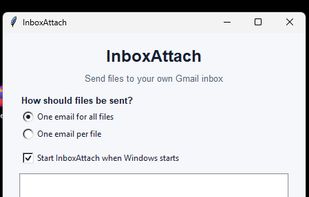
Flexible sending options: Send multiple files in a single email or one email per file.
Remembered recipient: Configure your preferred Gmail address once.
Start with Windows: Optionally launch InboxAttach automatically when Windows starts.
Google OAuth: Connect securely using Google's authorization process, with permission limited to sending emails.
Local operation: Files are sent through the Gmail API without passing through an InboxAttach-operated server.
No subscriptions or advertising: InboxAttach is free to use.
InboxAttach is currently available for Windows. A Google account is required to authorize sending emails through Gmail.







 InboxAttach added InboxAttach as alternative to Gmail, Outlook.com and Proton Mail


 InboxAttach


No comments or reviews, maybe you want to be first?