
iDroo icon
iDroo icon

iDroo

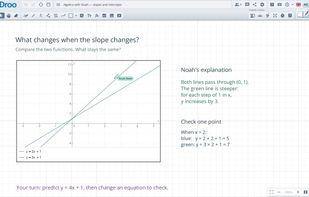
iDroo is a browser-based online whiteboard and teaching platform for tutors, teachers, students and teams. It runs in a web browser without a desktop installation.
iDroo screenshot 1

Cost / License

  • Freemium (Subscription)
  • Proprietary

Application type

Platforms

  • Online
  • Software as a Service (SaaS)
8likes
0articles
Save

Features

Properties

Features

Highlights All activities

iDroo News & Activities

Recent activities
  • aivopaas updated iDroo
  • kikyoulin liked iDroo

iDroo information

  • Developed by

    EE flagIteral Group OÜ
  • Licensing

    Proprietary and Freemium product.
  • Pricing

    Subscription that costs from $11 per month + free version with limited functionality.
  • Alternatives

    25 alternatives listed
  • Badge

    Get an embeddable badge for iDroo
  • Supported Languages

    • English
    • German
    • French
    • Italian
    • Turkish
    • Ukrainian
    • Spanish
    • Polish
    • Estonian
    • Russian
    • Romanian
    • Thai
    • Portuguese
    • Greek
    • Czech
    • Hungarian

Our users have written 1 comments and reviews about iDroo, and it has gotten 8 likes

iDroo was added to AlternativeTo by Riyaah on and this page was last updated .

Comments and Reviews

   
Top Positive Comment
MCQ333
0

Best whiteboard for math classes

Official Links

What is iDroo?

iDroo is a browser-based online whiteboard and teaching platform for tutors, teachers, students and teams. It runs in a web browser without a desktop installation.

Work together on an expanding canvas with freehand drawing, text, shapes, sticky notes and mathematical notation. Write equations using TeX-like commands, import PDFs, images and office documents, and annotate materials directly on the board. Boards are saved for later use.

Share a board by link or QR code, collaborate in real time, and manage participant permissions. Built-in chat, voice and video calls, and screen sharing keep communication alongside the whiteboard. Starting calls requires a paid plan; other participants can join an open call without a paid subscription.

Teaching tools include courses, lessons, assignments, student submissions, feedback and grading. Live Group Lessons combine a shared teacher board with private student workspaces and a view of class progress.

A free plan is available, with paid subscriptions adding features and capacity. Guest access depends on the board owner's plan and sharing settings.

