hyprmac started because Hyprland cannot be ported to macOS. Hyprland is a Wayland
compositor, and macOS has no Wayland session: WindowServer owns the screen and Apple
does not permit replacing it. So rather than a port, hyprmac is a native Swift rewrite
of the parts that do transfer.
It uses a dwindle layout, where each new window splits the one you are focused on along
whichever axis has more room, and it reads a configuration file in hyprland.conf syntax,
so sections, $mod variables, bind lines and dispatchers all behave the way a Hyprland
user expects. There are five workspaces, shown in the menu bar rather than in a separate
status bar, and vim-style keybindings that are all rebindable.
The design goal that separates it from most tiling window managers on macOS is that it is
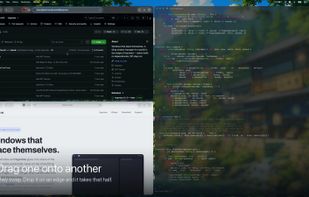
meant to be usable with a mouse and a trackpad, not only a keyboard. Drag a window onto
another and the two swap places. Drop it onto the left, right, top or bottom edge of a
window instead and that window splits along that axis, with the dragged window taking the
half it was dropped on; the target highlights before you release. Three fingers sideways
on the trackpad changes workspace, and three fingers up or down opens an overview where
you can press a number to jump to a workspace, click a window to go to it, drag to
reorder, or press R to rename.
hyprmac never requires System Integrity Protection to be disabled. It drives other
applications' windows through the Accessibility API, and Accessibility is the only
permission it asks for: not Screen Recording, not Full Disk Access, not Input Monitoring.
An earlier version used a screen capture to solve a window-layering problem and that
approach was removed, because a window manager asking to record your screen is difficult
to justify however good the reason.
It is written in Swift against the system frameworks with no dependencies and no bundled
runtime, which is why the disk image is about 1.8 MB. It makes no network requests at all:
there is no account, no analytics, no crash reporting and no update check. Builds are
signed with a Developer ID and notarized by Apple, so the app opens without a Gatekeeper
warning. Quitting it returns every window to where it was found.
Known limitations, as of the 0.1 beta: windows snap to their new size rather than
animating, because macOS exposes a window's position and size but not the move itself.
Only a single display is supported so far; plugging in a monitor relays out correctly but
a separate set of workspaces per screen is not built yet. Mission Control does not show
hyprmac's workspaces, since they belong to hyprmac rather than to macOS. Applications that
enforce a minimum window size of their own, mostly Electron and Catalyst ones, are floated
at that size instead of being squashed.
Requires Apple Silicon and macOS 14 or later. Free and MIT licensed.




 Keenan Carroll


No comments or reviews, maybe you want to be first?