HtmlDrag icon
HtmlDrag icon

HtmlDrag

HtmlDrag is a browser-based visual HTML editor designed for finishing existing and AI-generated web pages. Move from a first draft to production-ready HTML directly on the canvas without rebuilding pages from scratch.
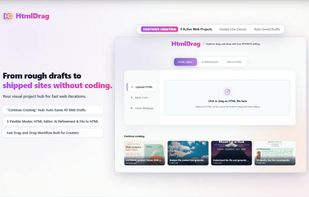
HtmlDrag screenshot 1

Cost / License

  • Freemium (Pay once or Subscription)
  • Proprietary

Application type

Platforms

  • Online  Works in modern web browsers. Desktop Chrome or Edge is recommended for the best canvas editing experience.
  • Software as a Service (SaaS)
2likes
0articles
Save

Features

Properties

Features

Highlights All activities

HtmlDrag News & Activities

Recent activities

HtmlDrag information

  • Developed by

    CN flagBowen Tu
  • Licensing

    Proprietary and Freemium product.
  • Pricing

    One time purchase ranging between $5 and $20, and / or subscription ranging between $10 and $20 per month + free version with limited functionality.
  • Alternatives

    52 alternatives listed
  • Badge

    Get an embeddable badge for HtmlDrag
  • Supported Languages

    • English
    • Chinese
    • Japanese
    • Korean
    • German
    • French
    • Spanish
    • Portuguese
    • Italian
    • Russian

AlternativeTo Category

Development
HtmlDrag was added to AlternativeTo by wenbo tu on and this page was last updated .

No comments or reviews, maybe you want to be first?

Official Links

What is HtmlDrag?

HtmlDrag is a browser-based visual HTML editor designed for finishing existing and AI-generated web pages. Move from a first draft to production-ready HTML directly on the canvas without rebuilding pages from scratch.

Three Connected Workflows:

  • Visual HTML Editor: Freeform drag-and-drop, inline text & image editing, style & CSS controls, table insertion/editing, layer management, and source code access.
  • Targeted AI Refinement: Select or box-select specific elements and describe your adjustments. AI applies scoped patches directly to your selection without rewriting the rest of the page.
  • AI File to Editable HTML & Webpage Cloning: Turn PDFs, Word docs, spreadsheets, slides, and images into clean, editable HTML, or clone public webpages as editable working copies.

Perfect For:

  • Indie hackers and vibe coders polishing landing pages exported from ChatGPT, Claude, v0, Lovable, or Bolt.
  • Marketers and growth teams adapting campaign pages, updating offers, and adding tracked UTM links.
  • Operations teams converting documents, catalogs, and presentations into web pages.
  • Email designers tweaking HTML email templates and newsletters.

Key Benefits:

  • Start instantly: Upload HTML, paste code, clone a URL, or generate from files and prompts.
  • Scoped AI safety: Preserve layouts and source outside authorized edit ranges.
  • Zero platform lock-in: Export standalone, clean HTML that runs anywhere without HtmlDrag runtime dependencies.

Free tier available. No credit card or installation required to try.

HtmlDrag Videos

Show 4 more videos
