Hivacy icon
Hivacy icon

Hivacy

An automatic boss key for Windows that hides your screen by itself — it uses your webcam to detect motion behind you, so you don't have to press anything.
using image

Cost / License

  • Freemium (Pay once)
  • Proprietary

Platforms

  • Windows
1like
0comments
0articles

Features

Properties

  1.  Privacy focused

Features

  1.  Ad-free
  2.  Dark Mode
  3.  No registration required
  4.  No Logs
  5.  No Tracking
  6.  Works Offline

Hivacy News & Activities

Highlights All activities

Recent activities

Hivacy information

  • Developed by

    US flagdyonkey
  • Licensing

    Proprietary and Freemium product.
  • Pricing

    One time purchase (perpetual license) that costs $5 + free version with limited functionality.
  • Alternatives

    5 alternatives listed
  • Supported Languages

    • English

AlternativeTo Category

Security & Privacy

GitHub repository

  •  0 Stars
  •  0 Forks
  •  0 Open Issues
  •   Updated  
Hivacy was added to AlternativeTo by DyonKey on and this page was last updated .
No comments or reviews, maybe you want to be first?

What is Hivacy?

Hivacy is an automatic boss key for Windows.

Traditional boss key tools rely on a hotkey — they only work if you notice someone coming and react in time. But the moments you actually get caught are the moments you didn't notice: headphones on, focused on your screen, someone walking in quietly behind you. By the time your hand reaches the keyboard, it's already too late.

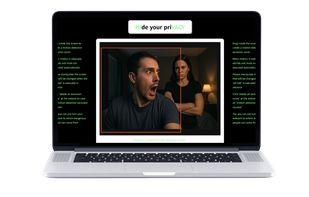
Hivacy removes the reaction time. It watches for movement behind you through your webcam and hides your screen the instant something moves — before anyone can see what's on it.

HOW IT WORKS

  • Launch Hivacy and your webcam view appears.
  • Drag a rectangle to create a motion detection exclusion zone. Anything inside the zone is ignored, so your own movement (or a busy background, a pet, a ceiling fan) won't trigger a false alarm.
  • Leave it running. When motion is detected outside that zone, your screen is hidden automatically.

FEATURES

  • Automatic, hands-free screen hiding via webcam motion detection
  • Motion detection exclusion zones to prevent false triggers
  • Multiple hide actions: Win+D, Alt+Tab, Alt+F4, Win+Ctrl+D (switch to a clean virtual desktop), Win+Ctrl+Right
  • Adjustable detection sensitivity — raise it when the door or hallway you're watching is further away
  • Lightweight background operation
  • Code-signed installer

PRIVACY Hivacy never records, stores, or uploads anything. The webcam feed is processed entirely in local memory for motion detection only, and is never written to disk or transmitted anywhere. There is no account, no cloud, and no telemetry attached to the video. It is a personal privacy tool — not a monitoring or surveillance product.

WHO IT'S FOR

  • Traders who don't want anyone reading their balance or P&L over their shoulder
  • People working from home whose kids, partner, or housemates walk into the room
  • Anyone working in a café, library, or coworking space where screens are visible
  • Anyone who wants what's on their screen to stay their own business

Free version includes automatic detection with Win+D hiding. The paid plan adds selectable hide actions and adjustable sensitivity as a one-time purchase.

Hivacy Videos

Show 1 more video

Official Links
