Heimdall3D is a 3D render engine for Windows 10 and 11. It draws AAA quality graphics with its own Vulkan renderer, and it shows its work inside the file manager. Every model, HDR image and motion capture file in Windows Explorer carries a thumbnail rendered from its own contents. The preview pane holds a lit view that orbits under the pointer, and a double click opens the file in a viewer window. The same renderer runs as a plugin for Directory Opus 13.
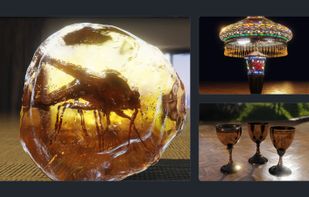
The preview is a full render. Materials, textures, shadows and indirect light draw as the file describes them. Glass filters the light passing through it and throws its colour onto the floor. Clearcoat, sheen, anisotropy and iridescence all draw.
Light comes from an HDR image wrapped around the scene, from the gallery or your own. Up to three lights of your own sit around the model. A gobo cuts a pattern into the key light: a window, a blind, foliage. Volumetric light makes the air visible, so a patterned window becomes separate shafts. The floor takes the shadow and reflects it, and a shadow catcher leaves the background transparent.
Depth of field, motion blur, bloom and ambient occlusion are there when you want them. Outlines follow the shape of the model, and cartoon shading turns the whole frame into one drawing. These are display settings, so they stay live while an animation plays.
A model's skeleton plays with every clip it carries, and the skinned mesh deforms with it. Node animation plays without a skeleton, so a door opens. A motion capture file with no mesh plays on a rigged mannequin.
Inspection views answer a question about the model: wireframe, normals, UVs, albedo, depth, roughness and metalness. A UV checker shows stretched or overlapping UVs as squares of the wrong size. The file's own numbers sit alongside: triangles, vertices, materials, textures and bounding size.
HDR images open in floating point at full range. Pulling exposure down recovers detail in a blown highlight.
A still leaves the viewer as a PNG at many times the size of the pane. A turntable records as a PNG sequence, an APNG, a GIF or an MP4. An animation clip exports as a sprite sheet for a 2D game, with every direction around the model on one grid.
Models and motion capture open from glTF and GLB, FBX, VRM, OBJ, PLY, COLLADA, 3DS, 3MF, STL and BVH. Images open from EXR, Radiance HDR, PFM, DDS, KTX2, Basis and TIFF. A format is listed when it arrives with its textures and its animation.
Nothing alters the file.






 EU
EU


 Christer-S-derlund added Heimdall3D as alternative to 3D Viewer Online, Online 3D Viewer, Exhibit, Open3D Viewer and 1 more
 Heimdall3D


No comments or reviews, maybe you want to be first?