HEIC to JPG Converter icon

HEIC to JPG Converter

Offline batch converter for iPhone HEIC/HEIF photos to JPG or PNG - keeps EXIF, one-time license, files never leave your PC.
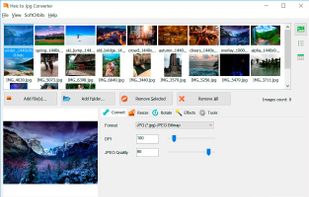
HEIC to JPG Converter screenshot 1

Cost / License

  • Paid
  • Proprietary

Application type

Platforms

  • Windows
0likes
0comments
0articles

Features

  1.  Image Conversion

HEIC to JPG Converter News & Activities

Highlights All activities

Recent activities

HEIC to JPG Converter information

  • Developed by

    US flagSoftOrbits
  • Licensing

    Proprietary and Commercial product.
  • Alternatives

    27 alternatives listed
  • Supported Languages

    • English

AlternativeTo Category

Photos & Graphics
HEIC to JPG Converter was added to AlternativeTo by SoftOrbits on and this page was last updated .
No comments or reviews, maybe you want to be first?

What is HEIC to JPG Converter?

HEIC to JPG Converter by SoftOrbits is an offline Windows tool to convert HEIC and open HEIC on Windows without the cloud. It batch-converts Apple and iPhone HEIC/HEIF photos to JPG or PNG right on your PC, so your images never leave your computer. iPhones save photos in Apple's HEIC/HEIF format to shrink file size, but many Windows apps, editors, websites and printers still cannot open them - this iPhone photo converter fixes that in one step. It reads Live Photos, animated HEIC and tiled HEIC containers, and keeps EXIF, date taken, HDR and wide-gamut color intact. A fast, private HEIF converter for photographers, designers and everyday users who just need shareable JPG or PNG files.

🔰 How to use

  1. Drag and drop HEIC files or whole folders into the app.
  2. Pick an output format - JPG by default, or HEIC to PNG, WebP, TIFF, BMP.
  3. Optionally set JPEG quality, resize, crop, rotate or rename by date taken.
  4. Choose the output folder, or use "Same as original".
  5. Click Start and let batch HEIC conversion process the whole set at once.

👍 Why choose it

  1. 100% offline - files stay on your PC, nothing is uploaded to any server.
  2. One-time license, not a subscription - no per-image credits or monthly fees.
  3. True batch mode to convert HEIC by the hundred or thousand in one run.
  4. Uses every CPU core for lightning-fast, multi-threaded HEIC to JPG conversion.
  5. Keeps EXIF, HDR and original Display P3 wide-gamut colors intact.
  6. Outputs JPG, PNG, WebP, TIFF, BMP and 40+ image formats.
  7. Reads HEIC, HEIF, HEVC, DNG, RAW, WebP and PSD as input formats.
  8. Built-in resize, crop and rotate tools to prep photos before export.
  9. Command-line and watch-folder support for automated conversion.
  10. Windows Explorer menu integration - right-click to convert.
  11. Runs on Windows 7, 8, 8.1, 10 and 11 (32-bit and 64-bit).

Great for

  • Photographers exporting iPhone shoots to JPG for editing and print.
  • Anyone posting or sharing HEIC photos that other apps reject.
  • Bulk-converting a full iPhone camera roll without opening files one by one.
  • Batch HEIC conversion of archived libraries with watch folders.
  • Users who need HEIC to PNG conversion with transparency and full metadata.

FAQ

  1. Is it private? Yes. Everything runs locally; no photo is ever sent online.
  2. Can it handle 1,000+ images? Yes - no file-count limit, and it keeps going even if one file errors.
  3. Does it keep quality? Yes - set JPEG quality and preserve HDR, EXIF and color profiles.
  4. Does it keep EXIF data? Yes - EXIF, date taken and color profiles carry over to the output.
  5. Can I convert HEIC to PNG? Yes - JPG, PNG, WebP, TIFF and BMP are all supported output formats, so you can pick lossy JPG for sharing or lossless PNG with transparency.

A private, one-time-purchase alternative to iMazing HEIC Converter, CopyTrans HEIC, XnConvert.