HandyPC lets you do PC-style work on an Android phone. Find a file in the built-in file explorer, open it in the text editor, fix it, and send it to a server over SCP or SSH — without sending the file back and forth to a PC just to edit it.
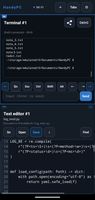
The core of the app is the file explorer and the text editor. A file that is already on the phone can be opened, searched, edited and saved right there, with line numbers, search and replace. SSH, a terminal and SCP are built in, so the same file can be sent to a server or handled on the server without switching apps. Tools open as tabs (add them with the + button), and up to two panes can be shown side by side, for example an editor next to a terminal.
Also included, as a bonus: network diagnostics (ping, ipconfig, global IP, LAN device list, port check, traceroute, DNS lookup). With a USB-C to RJ-45 adapter you can use the phone over a wired connection, for example to check a LAN on site.
What's inside
- File explorer
- Text editor (line numbers, search & replace)
- SSH client and terminal
- SCP (secure file transfer)
- Network diagnostics: ping, ipconfig, global IP, LAN device list,
port check, traceroute, DNS lookup
- Up to 2 panes side by side; add tools as tabs with the + button
- Wired connection support via USB-C/RJ-45 adapter
Who it is for
- People tired of moving files between the phone and a PC just to edit
or check them
- People who edit files on the phone and send them to a server over SCP
- Admins and engineers who want a quick edit or SSH session while away
from a laptop
Who it may not be for
If a dedicated file manager, text editor or terminal app already covers your workflow, there is no need to switch. HandyPC is aimed at people who want those steps in a single app.
Pricing: free for the first 2 months after install, then a one-time purchase on Google Play (no subscription).











 Pandaas LLC


No comments or reviews, maybe you want to be first?