GW Cadet is a Google Sheets add-on that lets you handle bulk Google Workspace admin work without touching a single line of code. Built by WolfLoop Technology in Nova Scotia, it turns a regular spreadsheet into a command centre for managing users, groups, licenses, and ChromeOS devices. You do not need any scripts or command-line tools.
How It Works
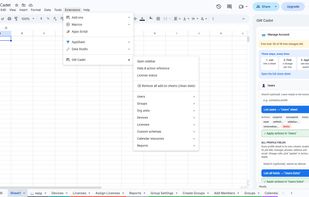
Everything runs right inside Google Sheets from a simple sidebar using three easy steps:
• List your data. Pull your existing users, groups, devices, rooms, licenses, or audit logs straight into spreadsheet rows.
• Pick your actions. Use built-in dropdown menus in the Action column to choose what you want to change, or type in custom details like new passwords.
• Apply the changes. Double-check a quick summary of your updates, hit run, and watch the Result column confirm each row as it finishes.
What You Can Manage
GW Cadet takes the headache out of everyday Google Workspace chores:
• Users and custom fields. Spin up new accounts in bulk from a template, suspend or restore users, move folks between org units, reset passwords, tweak email aliases, and edit custom directory fields.
• Groups and org units. Create, rename, or delete groups and organizational units, change posting or joining settings, and update member roles.
• Devices and meeting rooms. View, move, disable, re-enable, or deprovision ChromeOS devices, and manage calendar resources like conference rooms and shared gear.
• Licenses and audit logs. Check who has what license so you can add, swap, or remove Google licenses in bulk, plus pull read-only sign-in and admin activity reports.
Privacy and Security
• Direct connection. The add-on talks straight from your Google Sheet to Google’s official APIs.
• Your data stays yours. None of your directory or user info ever gets sent to external servers, sold, or used to train AI. The licensing system only tracks your domain name, admin email, and how many changes you run.
• Locked-down access. It only sees the specific spreadsheet you open it in and respects whatever admin permissions you already have.









 WolfLoop Technology

No comments or reviews, maybe you want to be first?