gPanel is a powerful management and automation platform designed to enhance and simplify the administration of Google Workspace. It provides administrators with a centralized interface to manage users, data, and security with greater efficiency and control than the native Google Workspace Admin Console. gPanel streamlines complex processes, automates repetitive tasks, and offers deep insights into your organization's Google Workspace environment, ultimately saving time and reducing administrative overhead.
gPanel significantly improves upon the standard Google Workspace admin console by offering a suite of advanced features and functionalities.
While the standard console provides basic administrative capabilities, gPanel extends these with robust reporting that goes beyond the six-month limitation of the native console, offering over 70 custom reports on user activity, security, and more.
Additionally, gPanel introduces powerful automation through its Rules Engine, allowing for the creation of custom workflows for tasks like user onboarding and offboarding, which can take minutes in the standard console but are reduced to seconds in gPanel.
The platform also provides more granular control over user roles and permissions, enabling the delegation of specific tasks without granting full administrative access.
Key functions of gPanel include:
Advanced Reporting: Generate comprehensive reports on documents, emails, groups, and user activity to gain insights and ensure compliance.
Automation Engine: Create custom rules and policies to automate user provisioning, deprovisioning, and other repetitive administrative tasks.
Granular User Management: Easily manage user settings for Gmail, Drive, and Calendar, including signatures, sharing permissions, and security settings.
Enhanced Security Controls: Implement detailed security policies, manage user roles with greater precision, and monitor for suspicious activity with detailed audit logs.
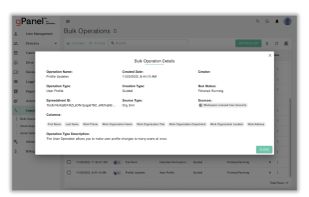
Bulk Operations: Perform updates across multiple users, groups, and organizational units simultaneously to save time and reduce manual effort.
API Integration: Connect gPanel with other business systems like HRIS and CRM for seamless data synchronization and workflow automation.




 Promevo
No comments or reviews, maybe you want to be first?