Guardian Eye icon
Guardian Eye icon

Guardian Eye

Desktop video surveillance for Windows, Linux and macOS. Records USB webcams and IP cameras locally, no cloud and no subscription.
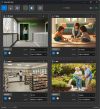
Guardian Eye screenshot 1

Cost / License

  • Freemium (Pay once)
  • Proprietary

Platforms

  • Windows  Windows 10 or 11, 64-bit
  • Linux  Ubuntu 20.04+, Debian 11+, Fedora 35+, 64-bit
  • Mac  macOS 12 Monterey or later, Intel and Apple Silicon
0likes
0comments
0articles

Features

Properties

  1.  Privacy focused

Features

  1.  Dark Mode
  2.  Ad-free
  3.  Webcam recording
  4.  No Subscription
  5.  IP camera
  6.  Video-surveillance
  7.  Motion Detection
  8.  Home Automation
  9.  Local Storage

Guardian Eye News & Activities

Highlights All activities

Recent activities

Guardian Eye information

  • Developed by

    ID flagGuardian Eye
  • Licensing

    Proprietary and Freemium product.
  • Pricing

    One time purchase (perpetual license) that costs up to $79 + free version with limited functionality.
  • Alternatives

    7 alternatives listed
  • Supported Languages

    • English
    • Arabic
    • Bengali
    • German
    • Spanish
    • French
    • Hindi
    • Indonesian
    • Japanese
    • Korean
    • Portuguese
    • Russian
    • Thai
    • Turkish
    • Vietnamese
    • Chinese
Guardian Eye was added to AlternativeTo by guardianeye on and this page was last updated .
No comments or reviews, maybe you want to be first?

What is Guardian Eye?

Guardian Eye is a desktop NVR that runs on your own machine. It records USB and built-in webcams as well as IP cameras over RTSP, ONVIF and MJPEG, and everything stays on your hardware: no cloud account, no monthly fee, and it keeps working when the internet is down.

Recording can run continuously, on motion, or only when AI detection finds a person, vehicle or animal. There is also audio detection and tampering detection, so you get an alert if a camera is covered, moved or defocused. Detection zones let you ignore areas that generate noise, like a road behind a window.

Events and camera states are exposed to Home Assistant, so recordings and alerts can drive the rest of your automation. Footage is written to local disk with retention you control.

Licences are one time purchases with free updates, not subscriptions. The free version has no time limit.

Official Links