

Gleem Crossfade icon

Gleem Crossfade

 1 like

Dual-mix virtual audio mixer for streamers: separate Monitor and Stream mixes per channel, with virtual microphones for OBS and Discord.
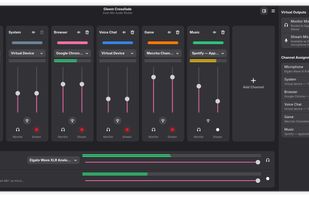
The mixer: every channel has a Monitor and a Stream fader, with the virtual outputs on the right.

Cost / License

Application type

Since

  • Since 2026

Updated

  • Updated Nov 2026

Platforms

  • Windows  Preview for Windows 10 (2004 or later) and 11. Its virtual audio driver is not Microsoft-signed yet.
  • Linux  Requires PipeWire.
1like
0articles
Save

Features

Features

Highlights All activities

Gleem Crossfade News & Activities

Recent activities

Gleem Crossfade information

AlternativeTo Category

Audio & Music

GitHub repository

  •  7 Stars
  •  2 Forks
  •  12 Open Issues
  •   Updated  
View on GitHub
Gleem Crossfade was added to AlternativeTo by Gleem on and this page was last updated .

No comments or reviews, maybe you want to be first?

Official Links

What is Gleem Crossfade?

Gleem Crossfade is a free, open-source virtual audio mixer for streamers, built on PipeWire for Linux, with a Windows preview. Every input channel (microphone, game, music, browser, voice chat) gets two faders: a Monitor Mix for what you hear, and a Stream Mix that shows up as a virtual microphone you select in OBS, Discord or Zoom. You can listen to music loudly while streaming it quietly, or keep a voice chat off the stream entirely.

An optional VOD Mix adds a third fader per channel and a second virtual microphone, so music can play live while your recording stays free of copyrighted audio.

Applications are moved into their channel automatically by name, and each channel can host VST2, VST3 and LV2 effects such as noise suppression, gates and compressors. MIDI controllers can be bound to any fader or mute button, with profiles and LED feedback, and a D-Bus API lets scripts and stream deck software control the mixer. No specific audio hardware is required.