
GhostPDF+ icon
GhostPDF+ icon

GhostPDF+

A free, open-source PDF toolkit for macOS. Compress, merge, split, and encrypt PDFs offline using a native SwiftUI interface.
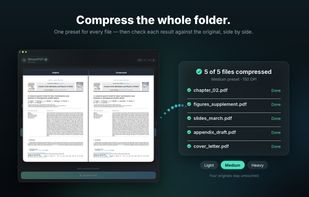
batch  compression

Cost / License

  • Freemium (Pay once)
  • Proprietary

Application type

Platforms

  • Mac  Free: macOS 11.0+ (Intel & Silicon) • Pro Bundle: macOS 13.0+ (Apple Silicon)

Features

Properties

  1.  Privacy focused

Features

  1.  OCR
  2.  PDF encryption
  3.  Dark Mode
  4.  Sign PDF files
  5.  Works Offline
  6.  Combine PDF
  7.  Ad-free
  8.  Portable
  9.  No Tracking
  10.  AES-256 Encryption
  11.  Split PDF files
  12.  No registration required
  13.  PDF compression
  14.  Native GUI
  15.  File Compression

GhostPDF+ News & Activities

Highlights All activities

Recent activities

GhostPDF+ information

  • Developed by

    SE flagUnknown
  • Licensing

    Proprietary and Freemium product.
  • Pricing

    One time purchase (perpetual license) ranging between $7 and $8 + free version with limited functionality.
  • Written in

  • Alternatives

    12 alternatives listed
  • Badge

    Get an embeddable badge for GhostPDF+
  • Supported Languages

    • English
GhostPDF+ was added to AlternativeTo by Oguz Umut Salman on and this page was last updated .
No comments or reviews, maybe you want to be first?

What is GhostPDF+?

GhostPDF+ is a modern, native macOS application designed to be a comprehensive, privacy-focused toolkit for PDF management. Powered by Ghostscript and built with SwiftUI, it offers professional-grade tools without monthly subscriptions.

Key Features:

  • Advanced Compression: Reduce PDF file sizes by up to 90% with smart presets or custom DPI controls.
  • 100% Offline & Private: Your sensitive data—bank statements, contracts, legal docs—never leaves your Mac.
  • PDF Manipulation: Merge documents, split by page ranges, reorder pages, or rotate orientations.
  • Security Tools: Encrypt documents (AES-128), remove passwords, and add watermarks.
  • Repair & Archive: Fix corrupted files and convert to PDF/A.

Pricing & Versions: GhostPDF+ is Open Source (AGPLv3) and the features are exactly the same in both versions. The only difference is convenience:

  1. Paid Version (Bundled): The "Plug & Play" option. It comes pre-bundled with Ghostscript, so it works instantly out of the box. No setup required.
  2. Free Version (Bring Your Own Engine): The exact same application code. However, to use it, you must manually install Ghostscript on your Mac (e.g., via Homebrew: brew install ghostscript). If you don't install the engine, the app will not function.

This model lets you pay for the convenience of an all-in-one install, or use the full professional software for free if you are comfortable managing your own dependencies.