GenPDF is an online PDF editor for editing existing text, converting documents, filling forms and working with multilingual PDFs.
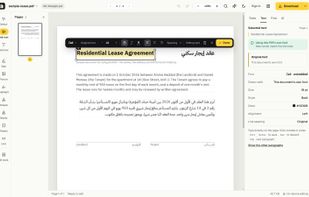
Its text editor lets users change words directly on the page. When the PDF’s embedded font contains the required characters, GenPDF can reuse it to help preserve the document’s typography, size, colors and spacing. Font indicators show when the original font or a replacement is being used.
GenPDF supports Arabic and right-to-left text, including documents containing both Arabic and Latin content. The interface is available in English, Arabic, French, German, Spanish and Portuguese, and works in browsers on desktop and mobile devices.
Document tools include signatures, highlighting, annotations, redaction, page organization, merging, splitting and compression. Conversion options include PDF to Word, Office documents to PDF, and PDF pages to images.
AI tools provide document translation, summaries and questions about selected pages. Translation creates a draft within the existing page layout for review before applying changes. Results may require adjustments for longer text, complex tables or unsupported content.
A searchable forms library lets users browse by country, purpose, language and publisher, check available editions and source links, and open forms in the editor.
Regular PDF text editing runs locally in the browser. Features such as OCR, Office-to-PDF conversion and AI processing use server services; AI processing sends selected document text after user consent.
GenPDF offers a free plan with usage limits and optional paid plans for higher usage.






 genpdf added GenPDF as alternative to Stirling PDF, PDF24 Creator, PDFsam Basic, Adobe Acrobat DC and 46 more


No comments or reviews, maybe you want to be first?