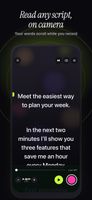
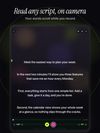
Gazecue Teleprompter is a teleprompter and camera app for iPhone and iPad. Your script scrolls right next to the front camera while you record, so you can read every word and still look into the lens. It is built for YouTube videos, TikTok and Reels, presentations, speeches, interviews, online courses, sermons and any video where you speak to the camera.
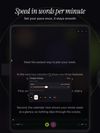
Write a script in the built-in editor, paste it, or import a .txt, .md, .rtf or .pdf file. The editor shows the word count and the estimated reading time. Set the scroll speed in words per minute (60 to 300) and change it while the text is moving. Text size, line spacing, margins, four fonts and a movable reading line help you find your place at a glance, and a 3, 5 or 10 second countdown gives you time to get ready before the take starts.
Record with the front or back camera while the text scrolls, or uset the camera, for example on a stage, in a meeting or behind a camera rig.
Every take is sngs library where you can play it back, share it or save it to Photos.
For teleprompter glass and beam-splitter rigs, mirror mode
flips the text r both, whilethe camera image and the saved video stay normal. You can
also scroll andyboard or aBluetooth page-turner that sends keyboard keys, which
works well with a teleprompterrig.
The free version includes unlimited scripts, the full prompter and 10p to one minute;shared videos carry a small mark. Gazecue Pro adds unlimited recoror modes, splitlayouts (script above or below the camera image), all themes, 1080p aon supporteddevices, and keyboard and page-turner control. No account or sign-in is nnd scripts andrecordings stay on your device. The app is available in 45 languages and s.








 EU

 Alex Johnson added Gazecue as alternative to QPrompt, Teleprompter Premium, Imaginary Teleprompter, NotchPrompter and 21 more

 eduard bruch



No comments or reviews, maybe you want to be first?