
Garnet PDF icon
Garnet PDF icon

Garnet PDF

 Like

Edit the text and pictures in a PDF, organise pages, fill in forms, sign and black out private details. Free for Windows and Mac, open source, with no account and nothing uploaded.
Garnet PDF screenshot 1

Cost / License

Application type

Since

  • New

Platforms

  • Windows
  • Mac
0likes
0articles
Save

Features

Properties

Features

Highlights All activities

Garnet PDF News & Activities

Recent activities

Garnet PDF information

Garnet PDF was added to AlternativeTo by code2box on and this page was last updated .

No comments or reviews, maybe you want to be first?

Official Links

What is Garnet PDF?

Garnet PDF is a free PDF editor that stays on your computer. Change the text and pictures in a PDF, move pages around, fill in forms, sign and protect your files. There is no account, no adverts and no limit on pages or files, and nothing is ever uploaded: Garnet PDF never connects to the internet.

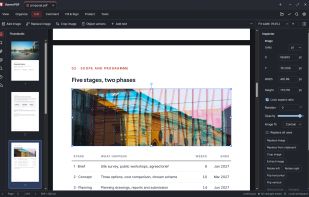
Edit: click a paragraph and type. Garnet PDF keeps the original font where it can and reflows the lines for you. Move, resize, crop or swap pictures. Works with Arabic and other right-to-left text.

Organise: drag pages into the order you want, rotate or delete them. Combine several files into one, or split one file into many. Add page numbers, headers and watermarks.

Comment and sign: highlight lines, add notes, arrows and shapes. Fill in forms and add your signature, which is kept on your own computer for next time.

Protect: add a password with 256-bit encryption. Black out names, numbers or whole areas: the hidden text is truly removed from the file, not just covered. Make big files smaller for email.

Garnet PDF is open source under the GNU Affero General Public License, version 3.