





Gamelabs Studio
1 like
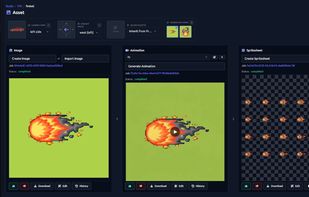
Generate transparent game sprites, animations, and spritesheets with AI. Multi-angle coherence, pixel-perfect output, and a built-in image editor.

Cost / License
- Pay once or Subscription
- Proprietary
Application typeApplication types
Platforms
- Online


Features
Highlights All activities
Gamelabs Studio News & Activities
Recent activities
 Erdeni added Gamelabs Studio as alternative to AnimGen
- macuseri686 liked Gamelabs Studio
- macuseri686 added Gamelabs Studio
 macuseri686 added Gamelabs Studio as alternative to PixelLab, Midjourney and pixie.haus


Developed by
 Gamelabs Studio
 Licensing
Proprietary and Commercial product.Pricing
One time purchase ranging between $5 and $50, and / or subscription ranging between $10 and $50 per month.Alternatives
4 alternatives listedBadge
Get an embeddable badge for Gamelabs StudioSupported Languages


No comments or reviews, maybe you want to be first?