
Game Compressor icon

Game Compressor

Stop deleting games due to low disk space! Game Compressor uses advanced Windows LZX technology to reduce game file sizes by up to 50%.
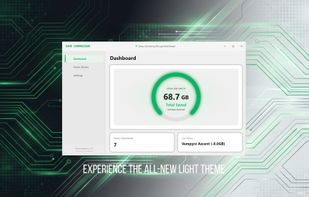
Game Compressor screenshot 1

Cost / License

  • Pay once
  • Proprietary

Platforms

  • Windows
0likes
0comments
0alternatives
0articles

Features

  1.  File Compression

Game Compressor News & Activities

Highlights All activities

Recent activities

Game Compressor information

  • Developed by

    Stonepit Sons
  • Licensing

    Proprietary and Commercial product.
  • Pricing

    One time purchase (perpetual license) that costs $5.
  • Alternatives

    0 alternatives listed
  • Supported Languages

    • English

AlternativeTo Categories

File ManagementOS & Utilities
Game Compressor was added to AlternativeTo by tomyan112 on and this page was last updated .
No comments or reviews, maybe you want to be first?

What is Game Compressor?

STOP "DISK FULL" ERRORS Game Compressor is a powerful tool designed to manage your storage space. You no longer need to delete old favorites to make room for massive modern AAA titles. It safely reduces the size of your game folders using Microsoft's native CompactOS (LZX) technology. HOW DOES IT WORK? (SMART COMPRESSION) Our program uses a transparent algorithm operating at the OS level: Physical Reduction: Your game files take up less physical space on the drive. Virtual Integrity: Windows and the Game Engine see the files as untouched and full-sized. Instant Performance: Your CPU processes data on-the-fly when you launch the game. Unlike ZIP/RAR, there are no extraction wait times; just compress and play directly. SUSTAINABLE SPACE MANAGEMENT (UPDATE FRIENDLY) Games receive constant updates, and files bloat again with every patch. Game Compressor is not a one-time solution. You can rescan updated games to keep your disk in shape. By compressing only new or changed files, you reclaim those precious GBs lost after every update. Remove accumulated "file bloat" from your active games with a single click. RESULTS & VARIANCE (HONEST ANALYSIS) Game Compressor features a smart engine that adapts to the game's file structure: High Savings (40-50%): Maximum space is recovered in massive AAA titles and Open World games with uncompressed audio/texture assets. Optimized Games: If a game is already heavily compressed by its developer (e.g., some competitive shooters), the LZX algorithm detects this and skips further compression to preserve file integrity. Our tool only processes efficient files to avoid unnecessary CPU load. SECURITY & ANTI-CHEAT Game Compressor does not interfere with RAM or inject code while the game is running. It operates solely on the file system. 100% Safe: No Ban risk in VAC, BattlEye, or other Anti-Cheat systems. Hardware Friendly: While freeing space on SSDs, it can also improve loading times on slower HDDs by reducing the amount of data read. Reversible: You can decompress files anytime with a single click. PERFECT FOR: Handheld Gamers: (ROG Ally, Legion Go, Steam Deck - Windows) Install more games without SD card limitations. Low Capacity SSDs: Provides a virtual disk expansion for Laptop users with 512 GB drives. Archivists: Perfect for those who can't bear to delete their games.