
FreeShape icon
FreeShape icon

FreeShape

 1 like

Free, offline, Onshape-style parametric CAD. Sketch, model, assemble, make 2D drawings (PDF / AutoCAD DXF) and sheet-metal flat patterns, all on your own computer, no account or cloud.
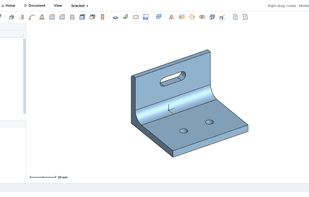
Bracket

Cost / License

Application type

Platforms

  • Windows  64-bit Windows only
  • Mac  Apple Silicon (M1 or newer) only, macOS 11 or later. Not yet signed by Apple: right-click → Open the first time.
  • Linux  AppImage for 64-bit x86; needs a 2024-or-newer distro (e.g. Ubuntu 24.04+, Fedora 40+). Runs from source on older systems.
1like
0articles
Save

Features

Features

Highlights All activities

FreeShape News & Activities

Recent activities

FreeShape information

AlternativeTo Categories

Photos & Graphics, System & Hardware

GitHub repository

  •  4 Stars
  •  0 Forks
  •  0 Open Issues
  •   Updated  
View on GitHub
FreeShape was added to AlternativeTo by richiewillmott on and this page was last updated .

No comments or reviews, maybe you want to be first?

What is FreeShape?

FreeShape is a free, open-source parametric CAD program that works like Onshape but runs entirely on your own computer. There's no account, no cloud and no subscription, and your designs are plain files on your own disk.

Part Studios: constrained sketches, extrude, revolve, sweep, loft, fillet, chamfer, shell, draft, holes (ISO clearance, tapped, counterbore, countersink), real ISO threads, patterns, mirror, booleans, variables and a rollback bar. Change a dimension and the part rebuilds.

Assemblies: linked parts with fastened, revolute, slider, cylindrical, planar and ball mates, an Onshape-style move/rotate triad, interference check, bill of materials and STEP export.

Drawings: 2D engineering drawings with hidden-line views, first or third angle projection, dimensions that update with the model and a title block. Export to PDF, or to AutoCAD DXF with real, editable dimensions.

Sheet metal: flanges, exact flat patterns using the K-factor, automatic corner reliefs, and flat-pattern DXF with bend lines for laser cutting.

Also: STEP import and export with colours, STL export for 3D printing, a view cube, a home page with recent projects, autosave and crash recovery, and light and dark themes.

FreeShape uses the OpenCascade geometry kernel (the same one as FreeCAD) and is written in Python with Qt. It is licensed under GPL-3.0 and runs on Windows, Mac (Apple Silicon) and Linux.
