Font Converter Tool Alternatives

Font Converter Tool is described as 'Convert Font extensions (otf, ttf, woff, eot)' and is an app in the os & utilities category. There are more than 100 alternatives to Font Converter Tool for a variety of platforms, including Windows, Web-based, Mac, iPhone and Linux apps. The best Font Converter Tool alternative is KDAN PDF, which is free. Other great apps like Font Converter Tool are Online Convert, Wondershare PDFelement, Zamzar and Able2Extract Professional.

Copy a direct link to this comment to your clipboard
Font Converter Tool alternatives page was last updated

Alternatives list

  1. PDFZilla icon
     4 likes
    Copy a direct link to this comment to your clipboard

    PDFZilla is a desktop software designed to convert PDF files into various formats. These formats include editable MS Word Documents, Rich Text Documents, Plain Text Files, Images, HTML Files, and Shockwave Flash SWF Files.

    76 PDFZilla alternatives

    Cost / License

    • Pay once
    • Proprietary

    Platforms

    • Windows
     
  2. FlexiPDF icon
     1 like
    Copy a direct link to this comment to your clipboard

    Your all-around PDF editor.

    Cost / License

    • Paid
    • Proprietary

    Application type

    Platforms

    • Windows
     
  3. Doxillion icon
     5 likes
    Copy a direct link to this comment to your clipboard

    Doxillion is a multi-format document and pdf converter and is the fastest way to convert DOC, DOCX, PDF, WPS, Word, HTML, EPUB, MOBI and other file types.

    12 Doxillion alternatives

    Cost / License

    • Free Personal
    • Proprietary

    Platforms

    • Mac
    • Windows
     
  4. Copy a direct link to this comment to your clipboard

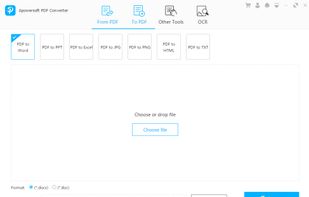
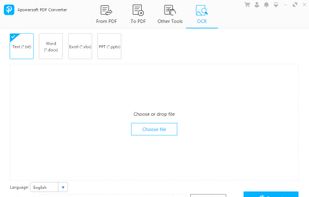
    Apowersoft PDF Converter is a one-stop PDF tool, which not only contains tools to converting PDF file to other formats, but can also convert other formats to PDF, even more, it can merge PDF, split PDF, extract images, OCR, encrypt/decrypt PDF, etc.

    105 Apowersoft PDF Converter alternatives

    Cost / License

    • Subscription
    • Proprietary

    Platforms

    • Windows
     
  5. Copy a direct link to this comment to your clipboard

    The File Converter will convert to and from nearly any file format!

    The File Converter can convert Videos, Audio, Documents, Ebooks, Images and Archives!

    1. Choose your input file

    2. Choose your output file format and file name

    3. Convert!

    4. Open your file in another app su.

    Cost / License

    • Paid
    • Proprietary

    Platforms

    • iPhone
    • iPad
     
  6. FreePDF icon
     13 likes
    Copy a direct link to this comment to your clipboard

    With FreePDF you can create PDF files from any application. Just choose File, Print and the printer FreePDF. With the results, you can also be seen in a print shop.

    Cost / License

    • Free
    • Proprietary

    Application type

    Alerts

    • Discontinued

    Platforms

    • Windows
     
  7. pdf995 icon
     7 likes
    Copy a direct link to this comment to your clipboard

    Pdf995 makes it easy and affordable to create professional-quality documents in the popular PDF file format. Its easy-to-use interface helps you to create PDF files by simply selecting the "print" command from any application, creating documents which can be viewed on...

    Cost / License

    • Free
    • Proprietary

    Application type

    Platforms

    • Windows
     
  8. PDFify icon
     2 likes
    Copy a direct link to this comment to your clipboard

    PDF creation with text recognition and scanner support. Features email and webpage import to PDF. Reduce file size by optimizing PDF.

    Cost / License

    • Freemium (Pay once or Subscription)
    • Proprietary

    Platforms

    • Mac
    • iPhone
     
  9. PDFOptim icon
     3 likes
    Copy a direct link to this comment to your clipboard

    PDFOptim is a simple and intuitive way to compress, reduce and optimize PDF file size. PDFOptim provides easy and effective ways to compress big image-rich PDF files using extensive set of options and presets.

    Cost / License

    • Pay once
    • Proprietary

    Platforms

    • Mac
     
  10. Copy a direct link to this comment to your clipboard

    Shrink pdf files.

    Cost / License

    • Free
    • Proprietary

    Platforms

    • Online
     
  11. CUPS-PDF icon
     5 likes
    Copy a direct link to this comment to your clipboard

    CUPS-PDF is designed to produce PDF files in a heterogeneous network by providing a PDF printer on the central fileserver. It is available under the GPL and is packaged for many different distributions or can be built directly out of the source files.

    Cost / License

    • Free
    • Open Source

    Application type

    Platforms

    • Mac
    • Linux
     
  12. Copy a direct link to this comment to your clipboard

    Online File Compressor is totally free online tool enabling you to compress image, video and PDF files. No registration and installation required, simply visit the webpage to compress file anytime you are available.

    Cost / License

    • Free
    • Proprietary

    Platforms

    • Online
     
You are at page 3 of Font Converter Tool alternatives