Flashcards.gg icon
Flashcards.gg icon

Flashcards.gg

Flashcard app that writes study sets with AI from a typed topic, a PDF, Word or PowerPoint file, or photos of notes, and schedules reviews with spaced repetition (FSRS). Works offline on iPhone, iPad, Android and in the browser; imports and exports Anki decks.
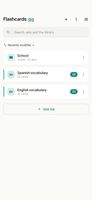
Home: sets grouped into folders
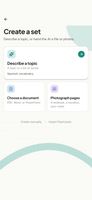
Create a set: from a topic, a document or photos
+5
AI generation from a typed topic

Cost / License

  • Free
  • Proprietary

Application type

Platforms

  • iPhone
  • iPad
  • Android
  • Android Tablet
  • Online
0likes
0articles
Save

Features

Properties

  1.  AI-Powered

Features

  1.  Dark Mode
  2.  Ad-free
  3.  No Coding Required
  4.  Works Offline
  5.  Cloud Sync
  6.  Srs
  7.  Learn with Flashcards

Flashcards.gg News & Activities

Highlights All activities

Recent activities

Flashcards.gg information

  • Developed by

    HR flagFlashcards.gg
  • Licensing

    Proprietary and Free product.
  • Alternatives

    7 alternatives listed
  • Badge

    Get an embeddable badge for Flashcards.gg
  • Supported Languages

    • English
    • Spanish
    • Portuguese
    • German
    • French
    • Italian
    • Dutch
    • Polish
    • Russian
    • Ukrainian
    • Turkish
    • Arabic
    • Hebrew
    • Hindi
    • Indonesian
    • Vietnamese
    • Thai
    • Japanese
    • Korean
    • Czech
    • Danish
    • Finnish
    • Swedish
    • Greek
    • Hungarian
    • Chinese
    • Romanian
    • Croatian
    • Norwegian Bokmål

AlternativeTo Category

Education & Reference

Apple AppStore

  •   Updated 
  •   5 avg rating
View in AppStore

Popular alternatives

View all
Flashcards.gg was added to AlternativeTo by tycoon on and this page was last updated .

No comments or reviews, maybe you want to be first?

Official Links

What is Flashcards.gg?

Flashcards.gg is a flashcard app for studying with spaced repetition. Sets can be written by hand or generated with AI from a topic typed in one line, from a document (PDF, DOCX, PPTX) or from photos of textbook pages, handwritten notes or a whiteboard. The AI can also fill in the back side of cards the user typed.

Study modes: Learn (spaced repetition with the FSRS scheduler, which decides when each card comes back), Test (type the answer or take a multiple-choice quiz), Browse, Random and View for a quick pass through a set. Cards can be read aloud with the voices installed on the device. A daily goal with an optional reminder can be set.

Import and export: Anki decks (.apkg) in both directions, plus CSV, TSV, TXT and JSON. A set or a whole folder can be shared with a link that opens without an account.

Library: a searchable collection of sets published by other learners (languages, law, biology, math, exam preparation) that can be added to one's own collection. Sets are grouped into folders, and one search box covers both the user's sets and the library.

Sets are stored on the device, so studying works offline. Signing in with Google or Apple syncs sets across phone, tablet and the web app. Internet is required for AI generation, the library, the multiple-choice test and sync.

The app shows no ads. The interface is available in 29 languages. A public REST API with personal keys is available for developers.