




Fastpotify
3 likes
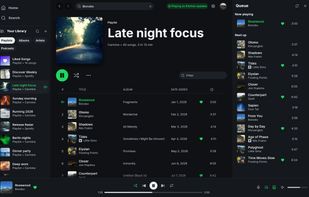
Spotify, native and fast. One lightweight Rust app for your whole library, local playback, and Spotify Connect on Linux, macOS, and Windows.

Cost / License
- Free
- Open Source (MIT)
Application types
 EU
EUPlatforms
- Linux
- Mac
- Windows
- Homebrew
- Nix Package Manager
- Arch Linux


Features
Properties
- Lightweight
- Support for Themes
Features
- Dark Mode
- Support for Lyrics
- Support for MPRIS
- Audio Visualization
- Playlists
- Podcast Player
- Integrated Search
- Built-in Equalizer
- Support for Keyboard Shortcuts
Fastpotify News & Activities
Highlights All activities
Recent activities
- brnntn liked Fastpotify
- sandeep85das liked Fastpotify
really fast on my i5-4210U and 8gb of memory.
- meyco liked Fastpotify
 POX added Fastpotify as alternative to Spotify-qt, Spotify, Spotube and SpotX
- POX added Fastpotify

Fastpotify information
Developed by
 Carmine Paolino
 Licensing
Open Source (MIT) and Free product.Written in
Alternatives
20 alternatives listedSupported Languages
- English

AlternativeTo Category
Audio & MusicGitHub repository
- 1,300 Stars
- 56 Forks
- 40 Open Issues
- Updated


What is Fastpotify?
A lightweight Spotify client with local playback, library access, and Spotify Connect controls for Linux, macOS, and Windows.
- Lightweight: A native binary with no browser engine. It starts in well under a second and typically uses 100–250 MB of RAM.
- Spotify Connect: Play locally, gapless and at up to 320 kbps, or control playback on a speaker, phone, or TV from the same window.
- Library and search: Browse playlists, Liked Songs, albums, artists, and podcasts. Search the catalogue and edit playlists you own.
- Themes: Use light, dark, or system mode. Pages and the player bar can take their colour from the album art.
- Winamp mini player: Ctrl+M opens a small player for classic Winamp 2 skins, with a spectrum analyser, equalizer, and playlist.
- MilkDrop: Run projectM’s MilkDrop visualiser in its own window, with fullscreen, preset packs, and keyboard controls.
- Desktop controls: Keyboard shortcuts, MPRIS media controls on Linux, and a tray option that keeps music playing after you close the window.
- Open source: MIT-licensed Rust built with egui and librespot. The docs explain its connections and stored credentials.
Comments and Reviews
really fast on my i5-4210U and 8gb of memory.