smcFanControl is the perfect application for all those Macbook owners getting burned by their hot-running Macbook.
Cost / License
- Free Personal
- Open Source
Alerts
- Discontinued
Platforms
- Mac

Fan Control is described as 'Some MacBook (Pro) are just to hot for daylong use. Fan Control adjusts the minimum fan speed depending on the current CPU temperature. For safety, it leaves the original automatic fan speed control intact' and is an app in the system & hardware category. There are more than 25 alternatives to Fan Control for a variety of platforms, including Windows, Mac, Linux, Android and iPhone apps. The best Fan Control alternative is Open Hardware Monitor, which is both free and Open Source. Other great apps like Fan Control are SpeedFan, AIDA64, Sidebar Diagnostics and HWMonitor.
smcFanControl is the perfect application for all those Macbook owners getting burned by their hot-running Macbook.

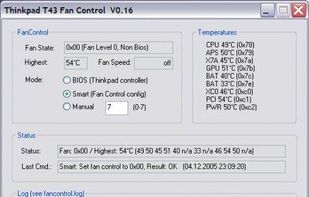
Solution to the cooling fan noise annoyances Thinkpad T4x (T40/T41/T42/T43) notebook series. Allows the user to control fan activity based on the system temperature. Win XP Visual C++ project controls the fan via port IO to the embedded controller.

EasyTune presents a convenient, Windows-based system performance enhancement and management utility. It features tools such as:
SysMetrix is a skinnable clock and metering application. Its purpose is to provide system metrics in a variety of interesting, useful, and cool ways. It can monitor and report on the hundreds of statistics


fancontrol is a shell script for use with lm_sensors. It reads its configuration from a file, then calculates fan speeds from temperatures and sets the corresponding PWM outputs to the computed values.

Corsair Link Dashboard software allows you to monitor your system and gives remarkable control over your case fans, lighting, and compatible Corsair power supplies and Hydro Series liquid CPU coolers that work together for optimal cooling and etc.


CPU Thermometer is one free CPU temperature monitor; it can help you monitor your computer CPU temperature in live time. Program can start with Windows start-up, and show live CPU temperature in your desktop tray icon, so you get this important system information at a glance.

Linpack is a benchmark and the most aggressive stress testing software available today. Best used to test stability of overclocked PCs. Linpack tends to crash unstable PCs in a shorter period of time compared to other stress testing applications.

Professional System Monitoring Utility designed for Mac.
xScan has been specifically designed to help you monitor the behavior and health of your Mac in a simple and straightforward manner. This is done in real time. No more needing to go ‘beneath the hood’ to find out all those.


eeectl is a tiny yet powerful program for Asus EEE PC 700 series, it runs on Windows® and allows you to control & overclock your EEE PC on the fly.
Hardware sensors monitor utilizes sensor chips on smart motherboards to track system and CPU core temperatures, voltages and cooling fans. By quickly catching an overheated computer, you can prevent disasters such as system instability or damage.


WinBar is a free and compact program that lets you monitor your system and provides easy access to frequently used controls. WinBar will run on Windows 2000 and newer operating systems and is available in 32 and 64 bit flavors.