
FalconLens icon
FalconLens icon

FalconLens

 Like

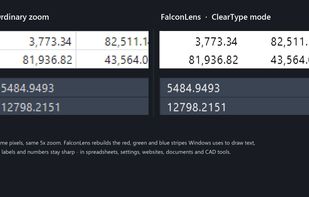
FalconLens is a small magnifying window you can drag anywhere on your screen. Put it over text you can't read and it shows what's underneath, enlarged 2x-5x. It works with every program: spreadsheets, documents, websites, settings windows, chat apps and design or CAD...
FalconLens screenshot 1

Cost / License

  • Pay once
  • Proprietary

Application type

Since

  • New

Platforms

  • Windows  Windows 10 version 2004 or later, Windows 11 (x64)
0likes
0articles
Save

Features

Properties

Features

Highlights All activities

FalconLens News & Activities

Recent activities

FalconLens information

  • Developed by

    MND Software
  • Licensing

    Proprietary and Commercial product.
  • Pricing

    One time purchase (perpetual license) that costs $1.
  • Alternatives

    7 alternatives listed
  • Badge

    Get an embeddable badge for FalconLens
  • Supported Languages

    • English
    • German
    • French
    • Spanish
    • Portuguese
    • Italian
    • Polish
    • Finnish
    • Swedish
    • Norwegian Bokmål
    • Chinese
    • Japanese

AlternativeTo Category

OS & Utilities
FalconLens was added to AlternativeTo by MNDSoftware on and this page was last updated .

No comments or reviews, maybe you want to be first?

Official Links

What is FalconLens?

FalconLens is a small magnifying window you can drag anywhere on your screen. Put it over text you can't read and it shows what's underneath, enlarged 2x-5x. It works with every program: spreadsheets, documents, websites, settings windows, chat apps and design or CAD tools.

Unlike ordinary magnifiers, FalconLens understands how Windows draws text. Its ClearType mode rebuilds each pixel's red, green and blue stripes, so small labels and numbers stay sharp instead of turning into blurry blocks with rainbow edges.

Features:

  • Works anywhere on screen, in any program
  • Stays where you put it - it doesn't follow your mouse
  • Zoom 2x-5x with the mouse wheel or one click
  • ClearType mode for the sharpest small text, plus crisp, medium and smooth modes
  • Global hotkey Ctrl+Shift+L to hide and show the lens
  • Save what the lens shows as an image (Ctrl+S)
  • Remembers its size, position and settings
  • No ads, no internet, no data collected
  • 12 languages

Available in Microsoft Store with a 1-day free trial.