EZexpenses — AI Expense Manager for Real-World Spending
Stop wasting time on manual expense reports and messy spreadsheets. EZexpenses uses advanced AI to read your receipts the moment you snap a photo — no typing, no errors, no lost receipts.
AI that actually does the work for you
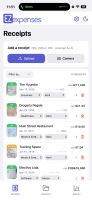
Upload a photo or point your camera at any receipt and AI instantly extracts everything: merchant, date, totals, line items, and payment card, then auto-categorizes it into Meals, Travel, Fuel, Lodging, Office Supplies and more. Filter receipts by category, expense name, date, or card in seconds so you always find what you need.
Multi-currency done the right way
EZexpenses is built for people who pay in different currencies every week. Every receipt is converted using the exact exchange rate from the day of purchase, not a random monthly average, so your reports match what really happened on your card. You can mix currencies freely in the same report, and EZexpenses keeps the original currency, the converted amount, and the rate used, making audits, reimbursements, and accounting crystal clear for both travelers and finance teams. No manual FX tables, no guessing, no end-of-month surprises.
Snap, scan or upload — any receipt, any format
Capture receipts with your camera, use built-in document scanning, or upload photos and PDFs from your library. EZexpenses handles all common formats and keeps everything legible and attached to the right expense.
Get organized with grouped expenses
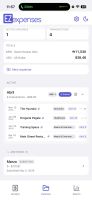
Group receipts into expenses with your own structure — by trip, client, project, or cost center. Assign multiple receipts to an expense in one click, move them between expenses easily, and keep everything clean and organized before you submit.










 v78d4ry9cm added EZexpenses as alternative to Expensify, Zoho Books, BILL Spend & Expense, Reimburse-it and 12 more


No comments or reviews, maybe you want to be first?