ExportMyMap lets you export your Google Maps saved places in just a few clicks.
Turn your Google Maps lists into usable files and shareable guides without Google Takeout, coding, or manual copy-pasting.
Features
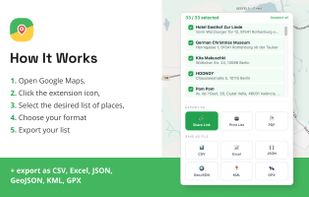
Export Google Maps saved places directly from your browser
No Google Takeout download required
Export to:
- PDF
- CSV
- Excel (XLSX)
- KML
- GPX
- GeoJSON
- JSON
Create shareable travel guides and maps
Generate printable lists with place names, addresses, and map links
Export unlimited places on any plan
Works with all your Google Maps saved lists, including Favorites, Want to Go, Starred Places, and custom lists
Simple Chrome extension setup
Fast export process with no technical knowledge required
Perfect for
Travelers planning trips
Digital nomads and expats
Researchers and journalists
Real estate professionals
Travel bloggers and content creators
Anyone with hundreds of saved places in Google Maps
Why use ExportMyMap?
Most export tools focus on technical GIS formats or require downloading large Google Takeout archives. Export My Map connects directly to your Google Maps saved places and lets you export them instantly.
Whether you want a GPX file for navigation, a KML file for Google Earth, a spreadsheet for analysis, or a beautiful PDF guide to share with friends, Export My Map makes the process simple.
Key Benefits
Direct export from Google Maps
No place-based pricing
Unlimited places supported
Multiple export formats
Shareable links and printable guides
Easy setup and beginner-friendly interface
If you’ve spent years collecting places in Google Maps, Export My Map helps you finally take your data with you.







 Aleksei Dementev added ExportMyMap as alternative to Google Takeout and Data Transfer Project

No comments or reviews, maybe you want to be first?