
Epson Print Layout icon

Epson Print Layout

Epson Print Layout allows users to format and lay out images on a page exactly how they want them printed. You can crop, resize, and drag around the images.
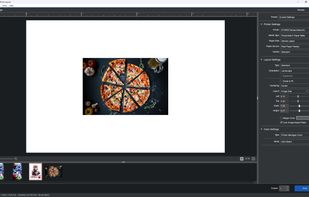
Main Design Page

Cost / License

  • Free
  • Proprietary

Platforms

  • Windows
  • Mac
  • iPhone
  • iPad
1like
0comments
0articles

Features

Epson Print Layout News & Activities

Highlights All activities

Recent activities

Epson Print Layout information

  • Developed by

    JP flagEpson
  • Licensing

    Proprietary and Free product.
  • Alternatives

    1 alternatives listed
  • Supported Languages

    • English
    • Azerbaijani
    • Belarusian
    • Bulgarian
    • Catalan; Valencian
    • Croatian
    • Czech
    • Danish
    • Dutch
    • Estonian
    • Finnish
    • French
    • German
    • Greek
    • Hindi
    • Hungarian
    • Indonesian
    • Italian
    • Japanese
    • Kazakh
    • Korean
    • Latvian
    • Lithuanian
    • Macedonian
    • Malay
    • Mongolian
    • Norwegian Bokmål
    • Polish
    • Portuguese
    • Romanian
    • Russian
    • Serbian
    • Chinese
    • Slovak
    • Slovene
    • Spanish
    • Swahili
    • Swedish
    • Thai
    • Turkish
    • Turkmen
    • Ukrainian
    • Uzbek
    • Vietnamese

AlternativeTo Category

System & Hardware

Apple AppStore

  •   Updated 
  •   4.56 avg rating
View in AppStore
Epson Print Layout was added to AlternativeTo by gamejumper49 on and this page was last updated .
No comments or reviews, maybe you want to be first?

What is Epson Print Layout?

Epson Print Layout is a freeware app and plugin that allows users to format and lay out images on a page exactly how they want them printed. Tools include dragging images, built-in high-res crop, and page size tools. It also functions as a Photoshop plugin.

Official Links
