
Edgely Console icon
Edgely Console icon

Edgely Console

 1 like

Edgely Console is a server connection manager for macOS, Windows and Linux, with a lighter mobile version for iOS and Android. It is built on a Rust core rather than Electron or Java.
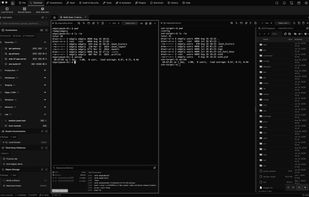
Two SSH sessions side by side, with the SFTP browser and the resource monitor

Cost / License

  • Free Personal
  • Proprietary

Application type

Since

  • New

Platforms

  • Windows
  • Mac
  • Linux
  • Android
  • iPhone
  • iPad
1like
0articles
Save

Features

Properties

Features

Highlights All activities

Edgely Console News & Activities

Recent activities

Edgely Console information

AlternativeTo Categories

Network & Admin, Development

Apple AppStore

  •   Updated 
  •   0 avg rating
View in AppStore

Popular alternatives

View all
Edgely Console was added to AlternativeTo by Djamel-TORCHE on and this page was last updated .

No comments or reviews, maybe you want to be first?

Official Links

What is Edgely Console?

Edgely Console is a server connection manager for macOS, Windows and Linux, with a lighter mobile version for iOS and Android. It is built on a Rust core rather than Electron or Java.

It brings SSH terminals, SFTP, SCP, FTP, FTPS and WebDAV file transfer, and built-in RDP, VNC and Apple Remote Desktop viewers into one app. Terminals open in tabs and split views with snippets, and a dual-pane file browser moves files between your machine and a server, or directly from one server to another.

Beyond connections, it manages Docker containers and Kubernetes clusters (logs, exec, port forwarding, deployments), Proxmox hosts, VMware vCenter and ESXi, and Hyper-V. It keeps AWS, Azure and Google Cloud machines as connections, browses and upgrades OS packages across servers, and audits Linux servers with CIS-inspired checks.

Dashboards show the CPU, memory, disk and network of your hosts as tiles. Run on group sends one command to every server of a group, and Compare group finds the one that differs. A connection tagged production gets a red frame, and a dangerous command asks before it runs. Terminals are recorded as text, RDP and VNC sessions export to MP4, and SSH forwards X11 when you turn it on.

An optional AI assistant (beta) suggests commands, diagnoses errors and writes scripts, on local Ollama or Claude Code, with privacy redaction on by default. A built-in MCP server and WASM plugins, such as a REST client and a message broker client, extend it.

Passwords and SSH keys stay on the device in an AES-256-GCM vault opened through the OS keychain or a master password. The vault is also your SSH agent, and a password can be read from 1Password, Bitwarden, KeePassXC or HashiCorp Vault at each login. Syncing connections across devices is optional and never carries credentials, and the app sends no telemetry. It is free and complete for personal use; paid plans add a commercial licence, more synced devices and priority support, and include Edgely Database Manager.