
Earshot Transcriber icon

Earshot Transcriber

 Like

Earshot transcribes calls, classes and recordings on your own computer. Nothing is uploaded and no bot joins the call.
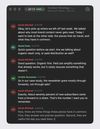
Live transcription of a Microsoft Teams call, with each speaker named (demo data)
Lines appear a moment after they are spoken (demo data)

Cost / License

  • Free
  • Open Source (MIT)

Application type

Since

  • New

GitHub

  • GitHub stars: 15

Platforms

  • Windows  Windows 10 or 11, transcribes once the call is over
  • Mac  macOS 26 or later, Apple silicon
0likes
0articles
Save

Features

Properties

Features

Highlights All activities

Earshot Transcriber News & Activities

Recent activities

Earshot Transcriber information

AlternativeTo Category

Audio & Music

GitHub repository

  •  15 Stars
  •  1 Fork
  •  0 Open Issues
  •   Updated  
View on GitHub
Earshot Transcriber was added to AlternativeTo by Bouliw on and this page was last updated .

No comments or reviews, maybe you want to be first?

Official Links

What is Earshot Transcriber?

Earshot transcribes calls, classes and recordings on your own computer. Nothing is uploaded and no bot joins the call.
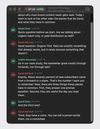
On the Mac, pick an app from the menu bar (Teams, Zoom, Chrome, Discord...) and Earshot transcribes only that app's audio, live or once the call is over. Notifications and music stay out of the transcript, and it works with the Mac muted. Your microphone can be added too, with echo cancellation.

After the call, Earshot works out who spoke when on the Neural Engine and uses the names from Teams live captions when it can see them. Apple's on-device model writes a short summary. Each session is filed under its calendar event, and transcripts export to text, Markdown or SRT subtitles. Audio and video files can be transcribed the same way.

On Windows, Earshot records the PC sound and the microphone on separate tracks and writes the transcript when the call ends.

Transcription runs on whisper.cpp. The interface is in English and French. Requires macOS 26 on Apple silicon, or Windows 10 or 11.
