
EarDub icon
EarDub icon

EarDub

EarDub is a Chrome extension for watching foreign-language YouTube videos with a spoken dub in your own language instead of reading subtitles.
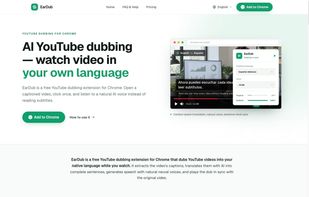
EarDub homepage: AI YouTube dubbing extension for Chrome

Cost / License

  • Freemium (Subscription)
  • Proprietary

Application type

Platforms

  • Google Chrome
0likes
0articles
Save

Features

No features, maybe you want to suggest one?

EarDub News & Activities

Highlights All activities

Recent activities

EarDub information

  • Developed by

    EarDub
  • Licensing

    Proprietary and Freemium product.
  • Pricing

    Subscription ranging between $10 and $20 per month + free version with limited functionality.
  • Alternatives

    5 alternatives listed
  • Badge

    Get an embeddable badge for EarDub
  • Supported Languages

    • English
EarDub was added to AlternativeTo by Chris3487428 on and this page was last updated .

No comments or reviews, maybe you want to be first?

Official Links

What is EarDub?

EarDub is a Chrome extension for watching foreign-language YouTube videos with a spoken dub in your own language instead of reading subtitles.

It works from the captions a video already has, including auto-generated ones. Caption fragments are first merged into complete sentences and translated with context, then voiced with neural text-to-speech and aligned to the original timestamps. When a translated line is longer than the original, the speech is sped up (up to 1.45x) rather than cut off.

Features:

  • 17 dubbing languages, including English, Spanish, Portuguese, French, German, Japanese, Korean, Chinese, Vietnamese, Arabic and Hindi
  • 60+ AI voices, switchable mid-video
  • Separate volume sliders for the original audio and the dub
  • Bilingual subtitles, resizable or hidden

Unlike subtitle translators, which show translated text on screen, EarDub gives you an audio track. Unlike YouTube's own auto-dubbing, it does not depend on the creator enabling it.

Free plan: 30 minutes of dubbing per day after signing in with Google. Paid plans add more hours. Videos without captions are not supported yet, and it currently works on youtube.com in desktop Chrome.