Duplicate Video Search is a Windows program that finds duplicate and similar video files by their picture content rather than by name or size. It builds a fingerprint for each video and compares the fingerprints, so copies with different names, containers, resolutions or bitrates can still be matched.
Besides identical files, it detects modified copies of the same footage: re-encoded, scaled, cropped or lower-quality versions. Sensitivity, the maximum time shift between clips and the number of seconds to skip at the start can be adjusted. Signatures are cached, so repeated scans of the same folders are faster, and indexing runs in multiple threads.
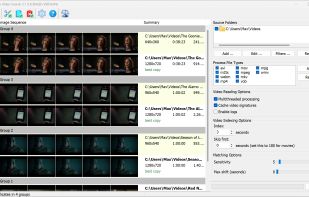
Matches are shown in groups with a strip of thumbnails, resolution, duration and file size for each file, plus a preview window. In every group the program picks the best copy using rules the user sets and ranks, such as favorite folders, resolution, bitrate, size, duration, format, date or file name, and marks the other copies. Marked files can be deleted, moved or copied, and the list can be exported to CSV.
MP4, MKV, MOV, AVI, WMV, WebM, MPEG, M2TS and VOB are supported out of the box, including AV1-encoded video, and other extensions such as FLV or 3GP can be added. No extra codecs are required. Files can be excluded by name, size or path masks, and results are kept between sessions. The program is 64-bit, runs on Windows 7 to 11 and is available in 12 languages.
The free trial has no time limit and no limit on the number of files, and it shows all duplicate groups. File paths are hidden, and deleting, moving, copying or exporting duplicates requires a license. A Home license (personal use, 1 PC) costs $39.95 and a Business license (home and office, 2 PCs) costs $99.95, both as one-time payments.







 kamagoroff added Duplicate Video Search as alternative to VideoDuplicateCleaner


 Bolide Software


Comments and Reviews
This program is fantastic! I have tried several programs that buy videos and this is the best by far!
It is the best software I could find... I searched many websites and this is simply the best, you can find your duplicate videos, you can manage and delete unnecessary copies as well as free up valuable space on your hard drives, this software uses your cpu or gpu according to your needs.
Thanks, cleaned my porn collection. Yes, as you can read in reviews, in trial version it detects the duplicates, show them to you, but doesn't allow any actions with them, so you cant move or delete the selected dupes. The bad thing, trial version doesn't display the actual file names, only several preview frames. So, you have to pay. In my case I think it worth the price.
Looks like there are only two apps that finds video duplicates by contents available at all. This one and Video Comparer. Actually, I bought both :)
doesn't work, and wants to charge you $30 for the pleasure
almost no options that can be set.
The match algorithm is average, but the interface is so poor it's unusable. A search on my library takes 12+ hours with loose parameters (it's 3+ hours with default ones) and it found real duplicates of different formats (codec, duration, name) + some false positives. Then I can do nothing with the results because the interface is buggy :
Also the website and emails feels alive, but Version 16 is in fact a version of 2012/2013.
I feel I loose my money in this not finished solftware that will probably never be.
Looks like you used some old version. The "results" are not saving, true, but in my case the option "cache video signatures" was set and when I add several new files to the scanned folders, it run the scan much faster. I think it processes only the new files in this case.
If the latest Duplicate Video Search doesn't work good for you too, consider Video Comparer. However, it is also not free, but do the same task