





DuoVox
Like
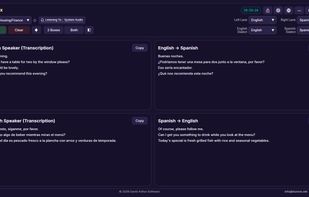
DuoVox puts a whole two-way conversation on one screen. Its 4-box view shows what each person says and its translation, live, side by side, so both people can follow without taking turns or tapping a button.

Cost / License
- Freemium (Pay once or Subscription)
- Proprietary
Platforms
- Windows


Features
DuoVox News & Activities
Highlights All activities
Recent activities
- David-Arthur added DuoVox
 David-Arthur added DuoVox as alternative to Google Translate, DeepL Translator, Microsoft Translator, iTranslate and 2 more
DuoVox information
Developed by
 David Arthur Software
 Licensing
Proprietary and Freemium product.Pricing
One time purchase and / or subscription + free version with limited functionality.Alternatives
6 alternatives listedBadge
Get an embeddable badge for DuoVoxSupported Languages


No comments or reviews, maybe you want to be first?