
Droper icon
Droper icon

Droper

 Like

Droper is a temporary shelf for drag and drop. Start dragging a file and the shelf appears; drop it there, switch apps at your own pace, then drag it out wherever it belongs.
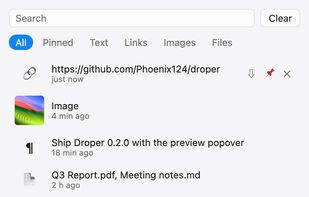
Droper screenshot 1

Cost / License

  • Free
  • Open Source (MIT)

Platforms

  • Mac
  • Windows
0likes
0articles
Save

Features

Highlights All activities

Droper News & Activities

Recent activities

  • Max-6517 added Droper
  • Max-6517 updated Droper
  • Max-6517 updated Droper
  • Yoink icon
    Max-6517 added Droper as alternative to Yoink and Dropover

Droper information

AlternativeTo Category

File Management

GitHub repository

  •  0 Stars
  •  0 Forks
  •  0 Open Issues
  •   Updated  
View on GitHub

Popular alternatives

View all
Droper was added to AlternativeTo by Max-6517 on and this page was last updated .

No comments or reviews, maybe you want to be first?

Official Links

What is Droper?

Droper is a temporary shelf for drag and drop. Start dragging a file and the shelf appears; drop it there, switch apps at your own pace, then drag it out wherever it belongs.

  • Appears when you drag: at the screen edge, under the pointer, or when you shake the pointer mid-drag. On macOS it reacts only to real drag sessions, not text selection or window moves.
  • Takes anything: files and folders, text (saved as .txt), links (.webloc / .url) and images straight from the browser.
  • Precise drag-out: a native addon checks whether the target app accepted the drop, so cancelled or refused drops never lose items.
  • Stacks: merge items into one stack, drag it out at once, or pull single files from it.
  • Quick preview with Space (images, PDF, text, video, audio, folders) and search with Cmd/Ctrl+F.
  • Lock items, restore removed items, compress the selection to ZIP or move files to the Trash.
  • Optional clipboard history with pins, search and filters.
  • Optional: new screenshots land on the shelf automatically.
  • Ignore list for apps you don't want it to react to.
  • droper:// URL scheme for Shortcuts, Alfred, Raycast and scripts.
  • Menu bar / tray icon, global shortcut, launch at login, Explorer "Send to → Droper".

No ads, no account, no tracking. The only network request is a daily check for new releases on GitHub, which can be turned off.

