

Driver Readiness Inspector icon

Driver Readiness Inspector

 Like

Driver Readiness Inspector is a native Windows diagnostic utility for investigating missing devices, driver startup failures and signing questions. It brings together PnP problem codes, installed package metadata, configured device/class filters, associated driver-service state...
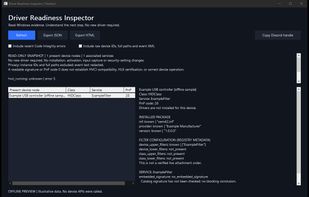
OFFLINE PREVIEW with illustrative data; no live device APIs were called. This image is not hardware validation.

Cost / License

  • Free
  • Open Source (MIT)

Since

  • New

GitHub

  • GitHub stars: 4

Platforms

  • Windows  Windows 10/11 x64. Read-only user-mode utility; some observations can be unavailable because of access restrictions.
0likes
0articles
Save

Features

Highlights All activities

Driver Readiness Inspector News & Activities

Recent activities

Driver Readiness Inspector information

AlternativeTo Category

OS & Utilities

GitHub repository

  •  4 Stars
  •  0 Forks
  •  0 Open Issues
  •   Updated  
View on GitHub

Popular alternatives

View all
Driver Readiness Inspector was added to AlternativeTo by Default-Titan on and this page was last updated .

No comments or reviews, maybe you want to be first?

What is Driver Readiness Inspector?

Driver Readiness Inspector is a native Windows diagnostic utility for investigating missing devices, driver startup failures and signing questions. It brings together PnP problem codes, installed package metadata, configured device/class filters, associated driver-service state and bounded inspection of local driver binaries.

Support teams can export local HTML or JSON reports from the interface or command line. Collection runs on startup or explicit refresh, without an idle monitoring loop. No additional driver, installation, account or administrator prompt is required; individual observations may remain unavailable because of access restrictions.

Signature and security observations have explicit limits. Embedded Authenticode checks use cached offline trust, configured filters are not a verified live attachment order, and HVCI configuration is distinguished from runtime enforcement. The utility does not repair drivers, run HLK or Driver Verifier, certify compatibility, or decide whether a driver is safe.

Reports omit raw device IDs, full paths and event payloads by default, while an explicit option can include them for support. Review reports before sharing: remaining labels, versions and hashes may still identify installed hardware or software. The application does not upload reports or change Windows security settings.

The complete Windows 10/11 x64 utility and source are available under the MIT license, including commercial use. There is no demo timer or paid feature unlock. Optional OEM branding, deployment integration, tailored reports and support are separate services.