
DriveForge icon
DriveForge icon

DriveForge

DriveForge is a free, open-source Windows tool that puts the disk jobs people normally need four separate programs for into a single portable executable. There is no installer: one file, about 80 MB, nothing written to Program Files, and nothing to uninstall.
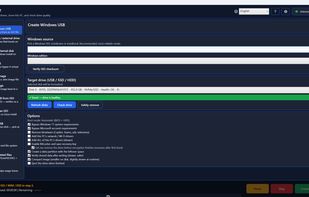
Creating a bootable Windows USB from an ISO

Cost / License

Platforms

  • Windows  Windows 10 and 11, 64-bit. One portable .exe, no installer.
0likes
0articles
Save

Features

  1.  NTFS Partition Recovery
  2.  No registration required
  3.  Incremental Backup
  4.  Schedule Backup
  5.  No Tracking
  6.  Portable
  7.  Disk Cloning
  8.  File Shredder
  9.  Multiboot USB
  10.  Windows To Go

DriveForge News & Activities

Highlights All activities

Recent activities

DriveForge information

AlternativeTo Categories

OS & Utilities, Backup & Sync, Security & Privacy, System & Hardware

GitHub repository

  •  2 Stars
  •  0 Forks
  •  0 Open Issues
  •   Updated  
View on GitHub

Popular alternatives

View all
DriveForge was added to AlternativeTo by ForgeLabsSoft on and this page was last updated .

No comments or reviews, maybe you want to be first?

Official Links

What is DriveForge?

DriveForge is a free, open-source Windows tool that puts the disk jobs people normally need four separate programs for into a single portable executable. There is no installer: one file, about 80 MB, nothing written to Program Files, and nothing to uninstall.

It creates bootable Windows USB drives from an ISO, WIM or ESD (BIOS and UEFI), writes any Linux or raw disk image (.iso, .img, .raw, .bin, .dd) to a stick, and builds multi-boot sticks that hold many ISOs at once through Ventoy. One image can be written to several drives in a single run, each erased, written, verified and put back before the next begins.

It clones the running PC to an external drive that boots on other hardware, or to an internal disk as a normal Windows install, and backs the machine up to a single .wim image file with full or incremental restore points, which it can restore to a blank drive and make bootable again.

It recovers deleted files on NTFS, exFAT and FAT, including a deep-scan carving mode that finds files after the filesystem entry itself is gone. It securely erases drives, wipes free space and shreds individual files. It creates, deletes, resizes, moves and converts partitions between MBR and GPT, and finds lost ones. Its Drive Diagnostic Center reads SMART data, benchmarks speed, scans the surface and repairs file systems.

No ads, no telemetry, no account and no phone-home. Everything core works offline. Available in 17 languages, including right-to-left layouts. Released under the GPLv3, built from tagged source by GitHub Actions, and every release carries a cryptographic build-provenance attestation.