Your old trips are already in your photo library. Driftlog reads the location saved in your photos and fills your map in. One purchase, no subscription.
Driftlog fills in your travel map by itself.
YOUR OLD TRIPS ARE ALREADY IN YOUR PHOTOS
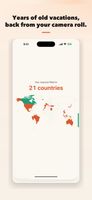
You do not have to start from today. Tap import once and Driftlog reads the location that is already saved inside your photos, then puts those trips on the map with their dates. Years of travel can appear in a minute.
It reads the location tag on a photo. It never looks at the picture itself.
If the location history your phone used to keep is gone, this is the thing to try. Your photos usually still remember where you were.
AND IT KEEPS GOING FROM TODAY
Turn on location once and leave it. Driftlog records the countries, cities and regions you pass through while it sits closed in the background. No check-ins. No writing anything down. Open it after six months and the map has been filling itself in the whole time.
WHAT YOU GET
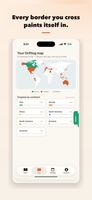
- A world map that colors itself in, country by country
- A passport with a landmark stamp for every country you have visited
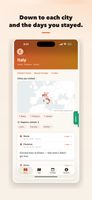
- A timeline by year, down to the cities you stayed in and the dates
- Memories: where you were on this day a year ago, and the year before that
- A welcome back recap when you get home
- Trip and year cards you can share
WHAT LEAVES YOUR PHONE
Your records stay on the device. There is no account and no server behind this app. No ads, no tracking, and the App Store privacy label says Data Not Collected.
Place-name lookups do go out, and it is worth saying plainly. To turn coordinates into a name like "Lisbon, Portugal", the coordinates are sent to Apple's map service, and when you type a city name to add a trip by hand, that name is sent to find where it is. That is all that is sent. Not your history, not your photos.
BEFORE YOU START
Automatic recording needs Location set to Always, with Precise Location on. Nothing is recorded while your phone is off. Without a data connection (roaming off, for example), Driftlog still notes the country you arrive in, except near borders, and adds the city name once you are back online.
The photo import only sees photos that carry a location. Photos taken with camera location switched off are invisible to it. You can add a location to them later in the Photos app: select them, tap the info button, then Add Location, and run the import again. The import also needs Photos access set to All Photos. On Selected Photos it only looks at the ones you picked.
A place counts as a trip when it has 3 or more photos on one day, or photos spanning 2 or more days and at least 6 hours apart, so a late-night landing plus a photo after midnight is not counted as an overnight stay. Shorter stops are treated as layovers and left out.
Your home area is excluded by default, inside a radius you can change in settings.
iPhone and iPad, iOS 17 or later. Portrait only. Made by one person.
Wander. It logs the rest.









 Akira-Takashima-7727 added Driftlog as alternative to Visited Countries Map

 Shiori Studio




No comments or reviews, maybe you want to be first?