Dreamwrite Studio icon

Dreamwrite Studio

 Like

Cross-platform writing software for novels, nonfiction, screenplays, plays, and theses. It combines binder, corkboard, outliner, timeline, revision tracking, consistency checks, writing goals, citation support, broad import/export options, Markdown storage, and folder-based syncing.
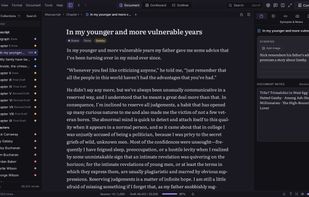
Dreamwrite Studio screenshot 1

Cost / License

  • Pay once
  • Proprietary

Application type

Since

  • New

Platforms

  • Mac
  • Windows
  • Linux
0likes
0articles
Save

Features

Properties

Features

Highlights All activities

Dreamwrite Studio News & Activities

Recent activities

Dreamwrite Studio information

AlternativeTo Categories

News & Books, OS & Utilities
Dreamwrite Studio was added to AlternativeTo by simbaesq on and this page was last updated .

No comments or reviews, maybe you want to be first?

What is Dreamwrite Studio?

Dreamwrite Studio is a cross-platform desktop writing application for novels, nonfiction, screenplays, stage plays, and theses. It organizes manuscripts, research, and notes in a binder, and includes a corkboard, outliner, timeline, plot grid, and editor modes for distraction-free writing, focus, and typewriter scrolling.

Revision tools include snapshots, tracked changes, semantic highlighting, and consistency checks for character names, timelines, and lore. Review copies can be marked up externally and reimported as tracked changes. The application also provides word-count targets, deadlines, writing streaks, and timed sprints. It exports to Word, PDF, EPUB 3, ODT, RTF, LaTeX, HTML, Fountain, and Final Draft, with presets for manuscripts, trade paperbacks, ebooks, and screenplays. Zotero and BibTeX citations are supported, alongside imports for Scrivener projects, Ulysses libraries, Word, Markdown, Fountain, Final Draft, OPML, and Aeon Timeline files.

Projects are stored as ordinary folders of Markdown files, allowing access in other text editors and synchronization through Dropbox, iCloud, OneDrive, Syncthing, or Git. No account is required, and the application has no analytics, telemetry, or built-in AI. It can connect to a user-provided assistant, including Claude or another MCP client, with edits returned as tracked-change suggestions. Dreamwrite Studio runs on Linux, macOS, and Windows and includes a command-line tool.