

Draw on Screen
Like
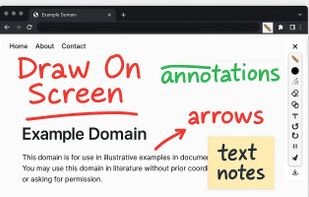
Draw, highlight, and annotate on any webpage with Draw on Screen — the simplest way to comment as you browse!.
Cost / License
- Free
- Proprietary

Platforms
- Google Chrome


+1


Draw on Screen
Like
Features
Properties
- Lightweight
- Privacy focused
Features
- Ad-free
- Annotate Screenshot
- Live Preview
- No Tracking
- Works Offline
- Non Destructive Editing
- Pressure Sensitivity
- Custom Brushes
- Browser extension
- Sketching
- Image Annotations
- Highlighter
- Teacher screen broadcasting
Draw on Screen News & Activities
Highlights All activities
Recent activities
turings added Draw on Screen as alternative to ZoomShot
Draw on Screen information
No comments or reviews, maybe you want to be first?
What is Draw on Screen?
Draw, Annotate, Screenshot & Share.
Transform your web browsing by easily drawing, highlighting, annotating, capturing screenshots, and scrolling pages without losing your annotations—directly on any webpage!
Key features:
- Freehand Pencil Drawing: Quickly sketch or highlight content directly on webpages.
- Multiple Colors & Brush Sizes: Adjust colors and thickness to clearly emphasize ideas.
- Shape Tools: Draw rectangles, circles, lines, and arrows to effectively illustrate your thoughts.
- Text Annotations: Insert text directly on pages to provide context or commentary.
- Undo/Redo: Effortlessly correct annotations with intuitive undo and redo buttons.
- Pause Mode: Temporarily disable drawing tools to interact normally with pages.
- Instant Screenshot Capture: Save and share annotated pages with a single click.
Who benefits from Draw on Screen?
- Students & Educators: Highlight key points, annotate study materials, or capture notes.
- Designers & Developers: Provide clear visual feedback or collaborate on design projects.
- Business Professionals: Mark up reports, presentations, and proposals effectively.
- Creative Individuals: Sketch ideas and visually communicate concepts quickly.
- Draw on Screen seamlessly integrates multiple annotation and screenshot tools into one user-friendly extension, boosting your productivity as you browse.
Install Draw on Screen today and transform the way you interact with web content!
