DockFlip icon
DockFlip icon

DockFlip

 Like

Miss what worked in Windows? Dock window lists, Flip 3D ⌘Tab and snapping in one free, open-source Mac app.
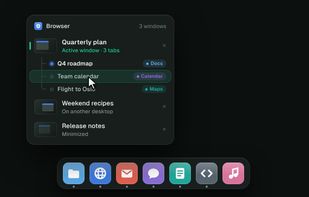
Hover an app in the Dock: its windows pop up in a list, with browser tabs under each window. Click a tab to jump straight to it.

Cost / License

Since

  • New

Updated

  • Updated Oct 2026

Platforms

  • Mac  Requires macOS 26 (Tahoe) or later. Apple silicon and Intel.
⌘Tab switches windows, not apps, in a Flip 3D stack. Type to filter: "plan" leaves only your plans.
Win-style snapping: ⌃⌥ + arrows for halves and quarters, or drag a window to an edge or corner.
+1
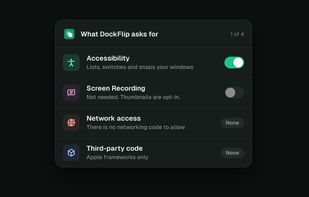
One permission: Accessibility. No screen recording, no network code, no third-party code.
Alternatives
0likes
0alternatives
0articles
Save

Features

Properties

Features

Highlights All activities

DockFlip News & Activities

Recent activities

DockFlip information

AlternativeTo Categories

Office & Productivity, OS & Utilities

GitHub repository

  •  0 Stars
  •  0 Forks
  •  0 Open Issues
  •   Updated  
View on GitHub
DockFlip was added to AlternativeTo by geezery on and this page was last updated .

No comments or reviews, maybe you want to be first?

Official Links

What is DockFlip?

DockFlip brings the Windows features Mac switchers miss most into one small, free, open-source app.

• Window lists in the Dock: hover an app to see its windows, with browser tabs listed under each window. Click the app in front to minimize, click again to restore. • ⌘Tab, Flip 3D edition: switches windows, not apps, in a slanted 3D stack. Minimized, full-screen and other-desktop windows included. Type to filter. • Snapping: ⌃⌥ plays the Win key for halves, maximize and quarters, or drag a window to an edge or corner.

It needs only the Accessibility permission and works without Screen Recording. No networking code, no dependencies, no settings to fiddle with. macOS 26+, Apple silicon and Intel.