DockDuck is a file manager for Mac built with Apple's own frameworks, with no Electron and no web views. It opens instantly and scrolls smoothly through folders with thousands of files.
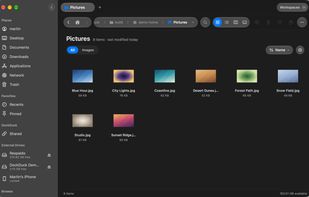
Browse in icon, list, column or gallery view, with tabs and up to six panes side by side. Each folder remembers the view, sorting and column widths you chose in it. Search answers while you type from DockDuck's own index, in the current folder or across the whole Mac, with filters for kind, size, date and tags, and saved searches that stay live in the sidebar.
Copy and move with a transfer panel that shows per-file progress, can verify every copy against the original, and can merge folders with the same name. Batch rename with a live preview and undo, compare two folders side by side, collect files on a shelf while you navigate, and compress or extract archives (zip, 7z, tar.gz, rar extraction and more).
Connect to servers over SFTP, FTP, SMB and WebDAV, with your Mac on one side and the server on the other. Passwords live in the macOS Keychain. Edit a file directly on a server, resume transfers, and import your sites from FileZilla. The Network page shows the computers around you and their shared folders in one place.
Also included: sending a file as an encrypted link, Free Up Space with a map of your disk, folder rules that keep a folder tidy, workspaces, a built-in terminal, Git status badges, color themes, and a connector that lets Claude work with your files when you allow it.
DockDuck follows your system: light and dark mode, your accent color, and 19 languages. It is a paid app with a free trial, available as a one-time purchase or a yearly plan. It requires macOS 15 or later and runs on Apple Silicon and Intel.






 Heylel Labs


No comments or reviews, maybe you want to be first?