
Ditty Clipboard icon

Ditty Clipboard

Free, open-source Mac version of the Windows clipboard manager Ditto: saves everything you copy and pastes it back with a hotkey.
Ditty Clipboard screenshot 1

Cost / License

Application type

Platforms

  • Mac
0likes
0articles
Save

Features

Properties

Features

Highlights All activities

Ditty Clipboard News & Activities

Recent activities

Ditty Clipboard information

AlternativeTo Categories

Office & Productivity, OS & Utilities

GitHub repository

  •  0 Stars
  •  0 Forks
  •  0 Open Issues
  •   Updated  
View on GitHub

Popular alternatives

View all
Ditty Clipboard was added to AlternativeTo by Ahmed-Chemkhi on and this page was last updated .

No comments or reviews, maybe you want to be first?

Official Links

What is Ditty Clipboard?

Ditty is a native macOS clipboard manager modelled on Ditto for Windows. It saves everything you copy (text, rich text, HTML, images and files copied in Finder) and lets you paste any of it back later.

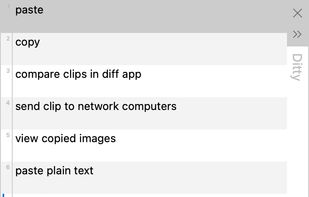
Press the hotkey and a small popup opens at your text cursor. Pick a clip, or type to search, and press Enter to paste it into the app you were working in. The popup follows Ditto's default look and keyboard workflow, so people moving from Windows will find it familiar.

Features:

  • Search as you type, with matches highlighted
  • Paste as plain text, or paste clips 1 to 10 directly with a shortcut
  • Paste Special: upper and lower case, capitalize, sentence case, camel case, slugify, remove line feeds, trim white space
  • Groups for organising clips, sticky clips that stay at the top, and "never auto delete"
  • Edit a clip's text and view full clips, including image previews
  • Light theme matching Ditto, plus a dark theme
  • Keeps the last 500 copies by default, with optional expiry
  • Skips copies that password managers mark as confidential
  • Everything is stored locally in a SQLite database; nothing leaves your Mac

Ditty runs on macOS 13 or later, on Apple Silicon and Intel. Install it with Homebrew (brew install --cask 20101997/tap/ditty) or download it from GitHub.

Ditty is an independent project and is not affiliated with Ditto or its author. Network sync between computers and importing a Ditto database are not available yet.