




DispHub
Like
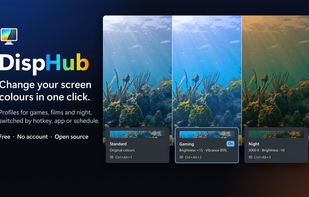
Save display colour profiles (brightness, contrast, gamma, colour temperature and vibrance) and switch them by hotkey, per app or on a schedule.


Features
Highlights All activities
DispHub News & Activities
Recent activities
- qlintenFX added DispHub
 qlintenFX added DispHub as alternative to Nvidia App, Iris, Monitorian, LightBulb and 3 more

Developed by
qlintenFXLicensing
Open Source (GPL-3.0) and Freemium product.Pricing
One time purchase (perpetual license) that costs from $6 + free version with limited functionality.Written in
Alternatives
7 alternatives listedBadge
Get an embeddable badge for DispHubSupported Languages
AlternativeTo Category
OS & UtilitiesGitHub repository
- 1 Star
- 0 Forks
- 2 Open Issues
- Updated


No comments or reviews, maybe you want to be first?