
DiskNebula
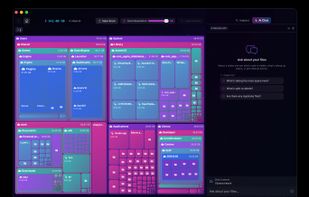
DiskNebula turns your storage into a living treemap, then uses private on-device AI to explain what is taking up space, what is likely safe to remove, and where to start cleaning up.
Cost / License
- Pay once
- Proprietary
Platforms
- Mac


DiskNebula
Features
Properties
- Privacy focused
Features
- Works Offline
- Delete Temporary Files
- No Tracking
- File Tagging
- Dark Mode
- Ad-free
- No registration required
- Apple Silicon support
- AI-Powered
- Duplicate File Finder
Tags
DiskNebula News & Activities
Recent activities
- Botary added DiskNebula
Botary added DiskNebula as alternative to GrandPerspective, SquirrelDisk, DaisyDisk and DiskPoint
DiskNebula information
What is DiskNebula?
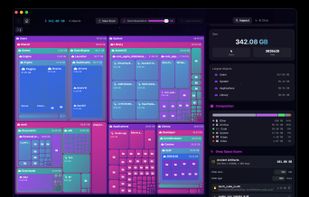
DiskNebula helps you understand your Mac's storage at a glance.
Instead of digging through Finder folders one by one, you get a live visual map of your disk, with the biggest files and folders immediately visible. Explore any branch, inspect large items, and clean up space with more confidence.
DiskNebula also includes AI-assisted cleanup guidance. You can download a local model to run analysis on-device, or connect your own compatible remote API. Ask questions like what is taking the most space, what is generally safe to delete, or whether a folder looks like cache, build output, or duplicate clutter.
Key features:
- Interactive treemap that makes large files and folders obvious
- Fast folder inspection with drill-down navigation
- AI cleanup guidance with optional on-device local models
- Optional support for compatible remote AI APIs
- Disk forensics for caches, logs, build artifacts, and duplicate patterns
- Trash-first deletion workflow for safer cleanup
- Undo support for items you restore from Trash
- Sandbox-friendly file access using user-selected folders
- No account required for local AI mode
- No subscription
Designed for people who want a faster, more visual way to understand disk usage without handing over their file metadata to a cloud service.