





DiskGarden
Like
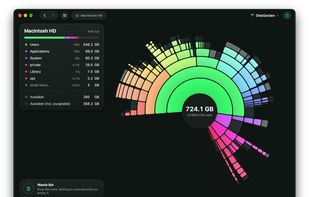
Free, open-source macOS disk space analyzer that draws every folder as a sunburst map, then clears what you pick through a review-first Waste bin.


Features
Highlights All activities
DiskGarden News & Activities
Recent activities
 Anirudh-Gupta added DiskGarden as alternative to Disk Inventory X
- Anirudh-Gupta added DiskGarden
 Anirudh-Gupta added DiskGarden as alternative to DaisyDisk, OmniDiskSweeper, GrandPerspective and Disk Inventory X


Developed by
DiskGardenLicensing
Open Source (Apache-2.0) and Free product.Written in
Alternatives
3 alternatives listedBadge
Get an embeddable badge for DiskGardenSupported Languages

AlternativeTo Categories
System & Hardware, OS & UtilitiesGitHub repository
- 1 Star
- 0 Forks
- 0 Open Issues
- Updated


No comments or reviews, maybe you want to be first?