
Dim + Filter Seen YouTube Videos icon

Dim + Filter Seen YouTube Videos

 Like

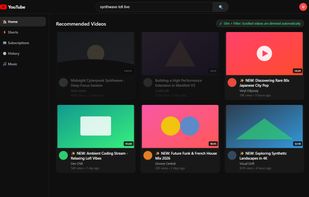
YouTube puts the same videos back in front of you, even after you already scrolled past them and decided not to click. This extension dims those tiles. It does not hide the homepage, strip the sidebar, or try to rewrite the recommender. The page stays intact.
Dim + Filter Seen YouTube Videos screenshot 1

Cost / License

  • Free
  • Open Source (MIT)

Since

  • New

Updated

  • Updated Nov 2026

Platforms

  • Google Chrome
  • Mozilla Firefox
  • Microsoft Edge
0likes
0articles
Save

Features

Properties

Features

Highlights All activities

Dim + Filter Seen YouTube Videos News & Activities

Recent activities

Dim + Filter Seen YouTube Videos information

AlternativeTo Category

Web Browsers

GitHub repository

  •  0 Stars
  •  0 Forks
  •  0 Open Issues
  •   Updated  
View on GitHub
Dim + Filter Seen YouTube Videos was added to AlternativeTo by sleepypussy on and this page was last updated .

No comments or reviews, maybe you want to be first?

What is Dim + Filter Seen YouTube Videos?

YouTube puts the same videos back in front of you, even after you already scrolled past them and decided not to click. This extension dims those tiles. It does not hide the homepage, strip the sidebar, or try to rewrite the recommender. The page stays intact. Repeats just take up less visual space.

Seen here means you spent two seconds looking at a tile and then scrolled on. It does not mean you watched the video. A feed tile is marked only after it stayed in view for two seconds and then left the view for two seconds. Fast scrolling does not mark anything. Videos you open stay clear. The main player is never dimmed. You can set the dim from 0 to 100 percent.

It works on Home, Subscriptions, Search, the watch sidebar, and Shorts. On a Shorts page, the current Short is marked after two seconds on screen.

This is not Unhook, LockedIn YT, or DF YouTube. Those tools hide pieces of the YouTube interface, such as the homepage feed, the sidebar, or comments. This one leaves the page in place and only dims tiles you already scrolled past. It is also not a hide watched tool. Those usually follow YouTube watch history. This one marks a tile you moved past, even if you never opened the video.

Everything stays in the browser. No account, no telemetry, no developer server. Seen and watch intent entries expire after 65 days. Settings stay until you change them. It is free, MIT licensed, and available for desktop Chrome, Firefox, and Edge.