
dfine.io Review icon

dfine.io Review

dfine.io Review is a video review tool for editors, colorists, agencies and post-production teams. You upload a cut, your team and your clients comment on the exact frame or draw on the picture, and you approve the version in the same browser tab.
dfine.io Review screenshot 1

Cost / License

  • Freemium (Subscription)
  • Proprietary

Application type

Platforms

  • Online
0likes
0articles
Save

Features

Properties

  1.  Privacy focused

Features

  1.  Support for 4K
  2.  Screen Sharing
  3.  VoiP Calls
  4.  Two-factor Authentication
  5.  Ad-free
  6.  Real time collaboration
  7.  Passkey Support
  8.  Image Annotations
  9.  Video collaboration
  10.  Video Conferencing
  11.  GDPR Compliant
  12.  Team Collaboration
  13.  Live Streaming
  14.  Online proofing
  15.  Video review

dfine.io Review News & Activities

Highlights All activities

Recent activities

dfine.io Review information

dfine.io Review was added to AlternativeTo by Stefan King on and this page was last updated .

No comments or reviews, maybe you want to be first?

Official Links

What is dfine.io Review?

dfine.io Review is a video review tool for editors, colorists, agencies and post-production teams. You upload a cut, your team and your clients comment on the exact frame or draw on the picture, and you approve the version in the same browser tab. New versions stack on the old ones, so you can compare two cuts side by side.

Clients don't need an account. You send them a share link and decide per link whether they can download or upload files, add a passphrase or an expiry date, and see when and from where it was opened. Folders can be password-protected, and an audit log records what happens in your organization.

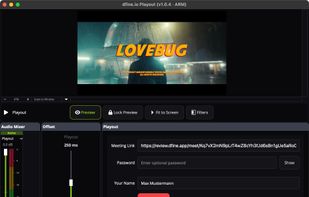
For live work you can open a video call next to the player, or stream a signal from your edit or grading suite over WHIP or RTMP. Everyone in the session can draw on the picture while you talk it through. The dfine.io Desktop app plays the stream out over SDI or HDMI to a reference monitor.

It takes the formats post-production actually uses, from MOV and MXF to EXR and DPX, and stores camera RAW, LUTs and project files for download.

