





DeskStitch
1 like
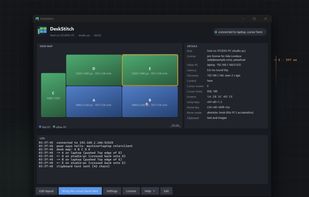
DeskStitch is a software KVM for two Windows PCs. Instead of arranging screens by pixels, it reads each monitor's physical size and lays them out on a desk map in millimetres, so a 4K screen next to a 1440p screen line up exactly as they stand on the desk: no dead zones, the...

Cost / License
- Paid
- Proprietary
Application typeApplication types
Platforms
- Windows


Features
DeskStitch News & Activities
Highlights All activities
Recent activities
- rated DeskStitch★★★★★
- DeskStitch added DeskStitch
- DeskStitch liked DeskStitch
 DeskStitch added DeskStitch as alternative to Mouse without Borders, Synergy, Barrier and Input Leap

DeskStitch information
Developed by
Seoane Montero ConsultingLicensing
Proprietary and Commercial product.Alternatives
13 alternatives listedBadge
Get an embeddable badge for DeskStitchSupported Languages


No comments or reviews, maybe you want to be first?