DeployLens icon
DeployLens icon

DeployLens

Real-time Kanban dashboard for your GitHub deployment pipeline. See every PR, build, and deployment flow from PR ? staging ? production. Free to try.

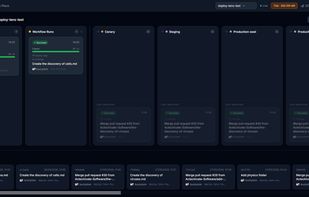
Screenshot of DeployLens dashboard showing open PR and workflow run

Cost / License

  • Subscription
  • Proprietary

Platforms

  • Online
Screenshot of DeployLens dashboard showing open PR and ongoing workflow run
Screenshot of DeployLens dashboard showing open PR and ongoing deployment to staging environment
+1
Screenshot of DeployLens dashboard showing links to GitHub
0likes
0comments
0alternatives
0articles

Features

  1.  Ad-free
  2.  Dark Mode
  3. Git icon  Git Support
  4.  Build automation
  5.  Continuous Monitoring
  6.  CI/CD
  7.  Continuous Integration
  8.  Continuous Deployment
  9.  Pipelines

DeployLens News & Activities

Highlights All activities

Recent activities

DeployLens information

  • Developed by

    GB flagActechivate Software Ltd
  • Licensing

    Proprietary and Commercial product.
  • Pricing

    Subscription ranging between $9 and $149 per month.
  • Alternatives

    0 alternatives listed
  • Supported Languages

    • English

AlternativeTo Category

Development
DeployLens was added to AlternativeTo by Thomas Williams on and this page was last updated .
No comments or reviews, maybe you want to be first?

What is DeployLens?

DeployLens is a real-time Kanban dashboard for GitHub deployment pipelines. It connects via a GitHub App and turns pull requests, workflow runs, and deployment events into a live, auto-updating board - driven by GitHub webhooks.

Instead of opening GitHub Actions repeatedly to check whether a build passed or a deploy landed in staging, DeployLens shows everything in one place: open PRs, in-progress workflow runs, and the current state of each deployment environment.

How it works

  1. Install the DeployLens GitHub App from the GitHub Marketplace
  2. Select your repositories
  3. Your pipeline board appears immediately - no YAML changes, no configuration required

What you see on the board

  • Pull Requests — open PRs with review status and check results
  • Workflow Runs — builds and checks in progress
  • Environments — one column per environment (staging, production, etc.)
  • Failures stay visible until resolved; all cards link back to GitHub

Security Reads pull request data, workflow run statuses, and deployment events only. No source code is accessed or stored.

Pricing 14-day free trial, no payment card required.

DeployLens Videos

Official Links