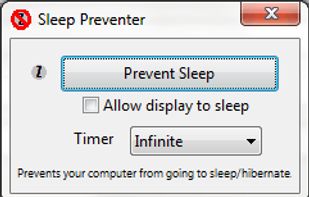
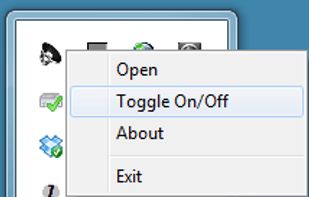
Prevents your computer from going to sleep, hibernate, dim the display or start the screensaver. Application runs in the system tray when closed. New in version v1.3: -Parameter support. v1.2: Option to let display fall asleep. v1.1: Sleep timer.


Deep Sleep is described as 'Simple Dashboard widget which allows users to put their computer into hibernation mode, also sometimes called software suspend mode. This widget only works on a limited number of Apple computer models' and is an app. There are more than 25 alternatives to Deep Sleep for a variety of platforms, including Mac, Windows, Linux, Flathub and Homebrew apps. The best Deep Sleep alternative is goguma app, which is both free and Open Source. Other great apps like Deep Sleep are Amphetamine, Stimulator, caffeinate & disablesleep and Caffeine for Mac.
Prevents your computer from going to sleep, hibernate, dim the display or start the screensaver. Application runs in the system tray when closed. New in version v1.3: -Parameter support. v1.2: Option to let display fall asleep. v1.1: Sleep timer.


Coffee allows you to keep the display awake without having to change the device settings. It can be toggled at various places:

Prevent your Mac from falling asleep, dimming your screen or starting the screensaver. Theine keeps macOS awake just like caffeine does with you.


This application is used to prevent the computer from going to sleep without changing system settings
NoSleep makes closing of your MacBook lid possible without going to a sleep mode. Now you shouldn't have to plug your mouse and monitor to stay computer awake - just activate it by clicking a menu bar icon or check a tick in the System Preferences and continue downloading...


SafeSleepOnce puts your Mac into safe sleep once and automatically enables normal sleep afterwards.

SleepTime is a light-weight app that lives on your menu bar, letting you easily set a timer to put your Mac on sleep automatically after a specified time period you choose.


Are you one of countless Windows users who have configured Power Options to suspend the monitor after a minute, only to realize how long a minute is? Who then had to revert that setting the day after the party, when you just wanted kill the display after kicking off a tasty...
ScreenWakeUp is a free, browser-based tool that keeps your screen from sleeping or locking. It uses the modern Screen Wake Lock API — nothing to install, no admin rights, no account. Open it in any browser on Windows, macOS, Linux, ChromeOS, Android or iPhone and click one...

Close the lid. Keep coding. Hold My Lid keeps your Mac awake while Claude Code, Codex, and your other agents finish the job — lid shut, in your bag.