Android tells you how much mobile data you used, but not which app is responsible, and it will not stop it. Data Saver does both.
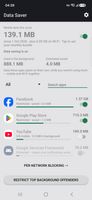
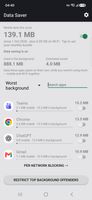
Every app is ranked by how much data it used in the current billing cycle rather than the calendar month, which is what Android's own per-app screen defaults to and the reason its figures rarely match a carrier bill. Mobile and Wi-Fi are counted separately. Each app is split into foreground and background, so you can see what an app spent on its own while you were not using it.
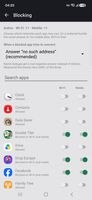
Apps can then be restricted straight from the row showing their usage, and separately per network, so an app can be blocked on mobile data while continuing to work normally on Wi-Fi. There is a one-tap action for restricting everything that spends most of its data in the background, a monthly bundle gauge showing what is left, and an estimate of what each restriction has saved since it was applied.
Notifications keep working. On Android they are delivered through Google Play Services rather than each app's own connection, so blocking the wrong thing silences the entire phone. Play Services, the dialler and the messaging app are protected and clearly marked, along with the equivalent push services from Samsung, Xiaomi, Huawei, Honor, OPPO, vivo and Meizu.
The app has no INTERNET permission. It is absent from the manifest, so the app cannot open a network connection at all. There are no accounts, no analytics, no crash reporting, no advertising and no servers. The figures come from counters Android already keeps on the device, and the source is public under GPL-3.0.
Blocking uses Android's VpnService in package-list mode to create a local connection on the device only. No remote server is involved and no traffic leaves the phone through the app. Because Android shows a key icon and a quick-settings notice for every app using this API, both appear here too, although nothing is being routed anywhere.
One limitation worth knowing: Android permits a single VPN at a time, so the app cannot run alongside a conventional VPN client.
Requires Android 7.0 or later and works entirely offline.









 AnubisProductions added Data Saver: Usage & Blocker as alternative to NetGuard, RethinkDNS, TrackerControl and AFWall+



No comments or reviews, maybe you want to be first?